Project Infinity Public BETA
Download
How to use:
- Download and extract all mods into one folder
- Optional: extract BWFixpack into the same folder and install it one time only
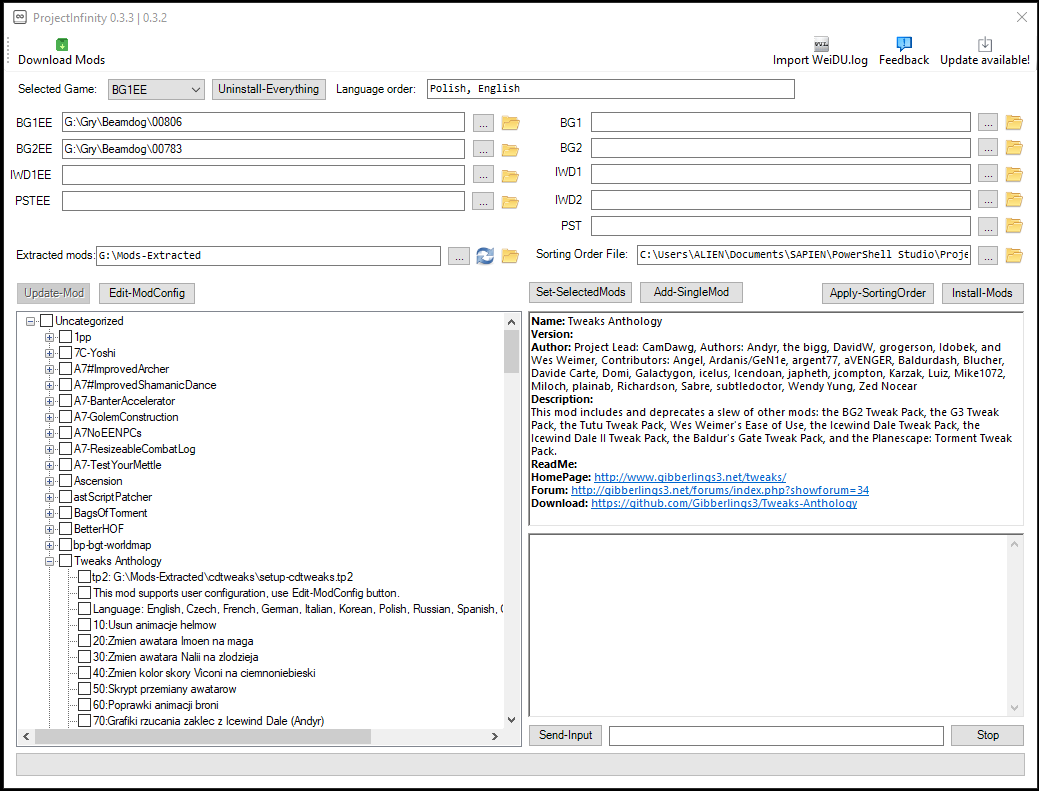
- Run ProjectInfinity, select folder where you extracted all mods
- Select all mods and components, click "Set-InstallationSequence"
- Modify install sequence via copy & paste or "Sorting Order" feature
- Start installation via "Install-Mods" button
- you need fully updated Windows 7/8.1/10 64-bit
- for Windows 7/8, you need .NET Framework 4.5.2 or above and Powershell 5.1 already installed
- you need to install Git for mod Delta Updates: https://git-scm.com/downloads
- possible to hang when installing huge amount of mods
- basic GUI design
Features:
- application doesn't require 24/7 maintainer
- works with every game version
- reuse own-defined mod list
- reuse own-defined install order
- quick uninstallation of all mods from selected game
- delta updates for Github Mods
- folder with extracted mods can have infinite depth like X:\Mods\Quests\... or X:\Mods\NPC\...
- converting WeiDU.Log into install sequence
Features for modders:
- support for Mod metadata: https://bit.ly/2HDf1Xu
- support for one-click updates and Delta Updates for Github mods: https://bit.ly/2CSN4p6
- support for Mod config: documentation will be provided later
- support for Universal Infinity Engine Mod Package/.iemod files: documentation will be provided later
Planned Features:
- GUI redesign
- mod categories
- caching and multi-threading
- EET full installation
- internal conflicts and dependence for single Mod
- external conflicts and dependence for multiple Mods
- support for scripted installation
- drag and drop support for all major features
- cross-platform
- build-in backups
- build-in static mod link list (require 24/7 maintainer)
- build-in static compilations (require 24/7 maintainer)
- build-in, forced installation of the BWFixpack (require 24/7 maintainer)
- build-in static conflict and dependencies list (require 24/7 maintainer)


![Midge Ure – A Man of Two Worlds (2026) [Official Digital Download 24bit/96kHz]](http://imghd.xyz/images/2026/05/09/zvc67e2mth34l_600.jpg)