Revised Dragon Scale V4
a UI mod for Baldur's Gate: Enhanced Edition with Siege of Dragonspear installed. Now compatible with EET.
This is a mod for folks who feel the new UI introduced by Siege of Dragonspear was... almost there.
It's a minor overhaul of SoD's UI with a lot of little tweaks and fixes, as well as some completely reworked screens, which are individual components, for your convenience.
Screenshots and Component Breakdown:
Main Component: SoD UI Fixes and Minor Tweaks
[spoiler]The main component fixes and tweaks a few thing that bugged me about the UI:
![image]()
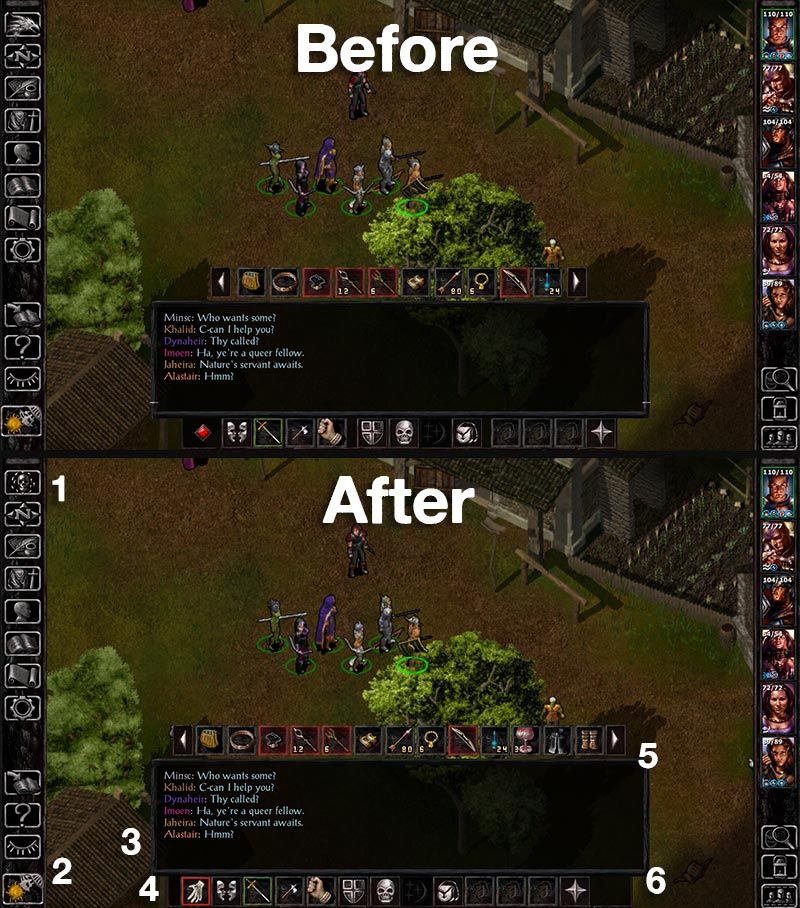
1) The Bhaal logo has been restored as the Return to Game button, which now changes dynamically according to the campaign you're playing, so when playing SoD, you'll still see the original button with the dragon.
2) Buttons on the left sidebar bottom have been slightly repositioned. Clock/pause button is now centered.
3) The little white line on the bottom of the dialogue/gamelog window has been removed. I don't know what it was doing there in the first place.
4) There's a new button for the quickloot toggle.
5) More quickloot slots! There are now 4 extra quickloot slots for a total of 13.
6) Action bar buttons are now equidistant which makes things aesthetically more pleasing. Those buttons used to be grouped in clusters to mimic the distribution of a keyboard's function keys. It made perfect sense back in the day but that particular layout is not as used nowadays, so...
![image]()
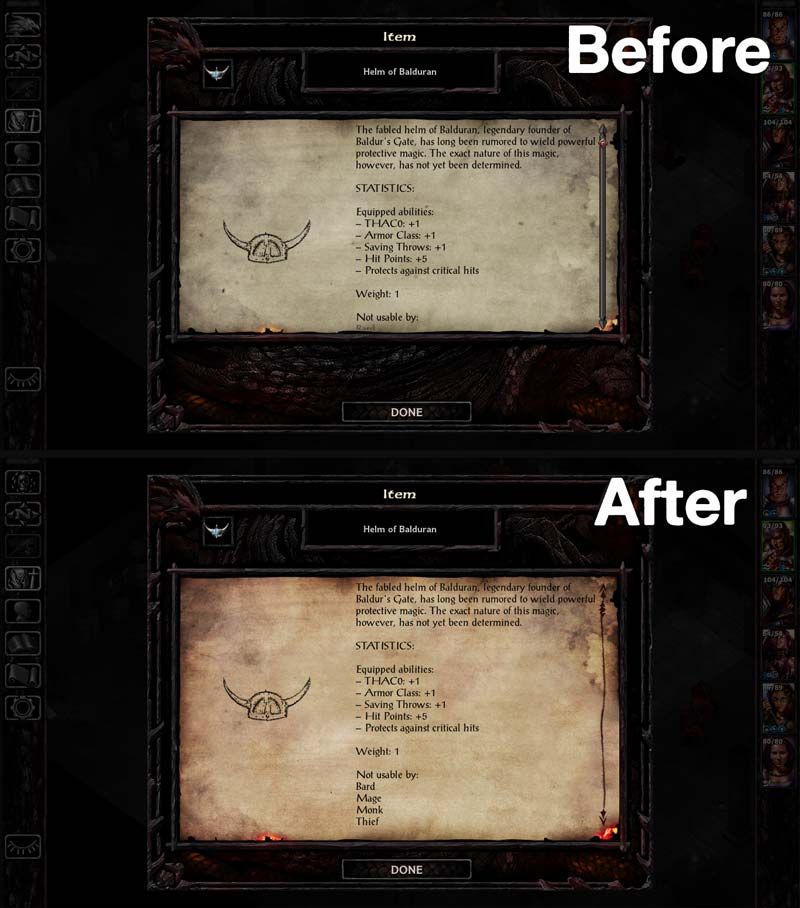
All parchment graphics have been replaced with a more saturated version. I'm not the only one who thought the color was a bit too muted. They also have the proper scrollbar now.
![image]()
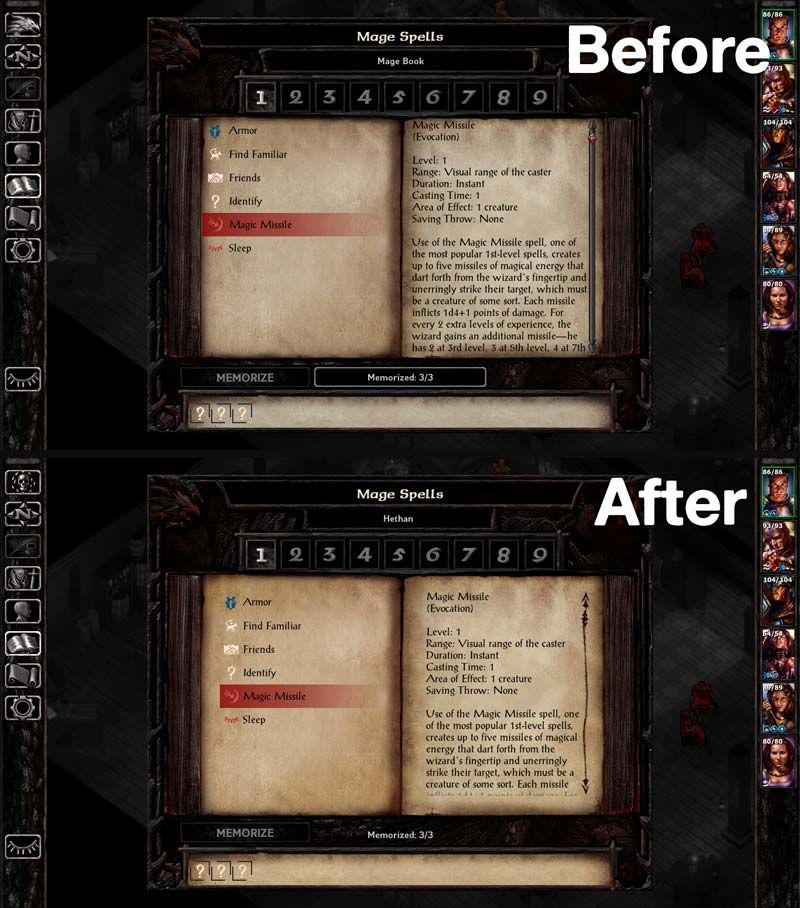
Margins on the Mage Book and Priest Scroll screens were tweaked and are now a bit nicer to look at. This is for people who were sold on the new layout of these screens. For those who miss the old behavior, please keep reading.
![image]()
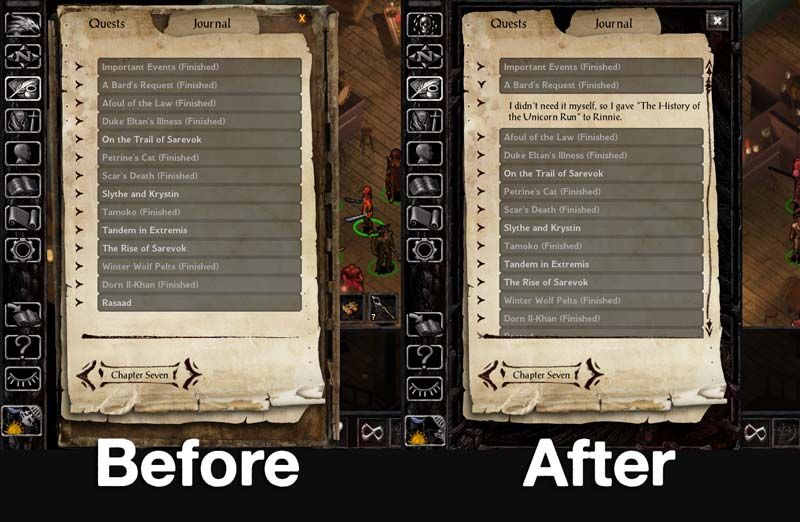
The journal has a new background graphic (offered by Pecca) and close button. I think now it's better integrated with the UI.
![image]()
Store panels are properly joined. The headers are also consistent now.
![image]()
The Dual-Class screen portrait has had it's aspect ratio fixed. How that got past QA is beyond me.
![image]()
Area Map screen has a new graphic header. The World Map button has also been restored.
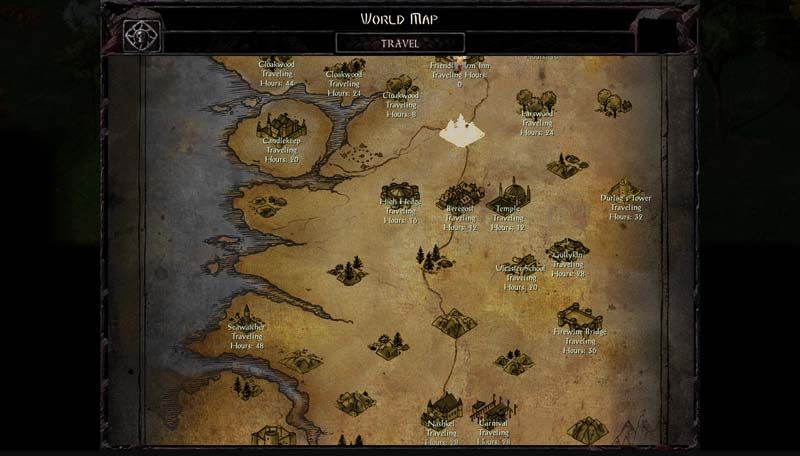
World Map also has a new header. Travel Button has been repositioned.
You may also have noticed the new desaturated/colored worldmap, with a few elements from the original BG1 brought back. It's still not perfect, but at least it's more consistent with SoD's worldmaps.
![image]()
Redesigned Options Screen, including bigger buttons which have also been ported to the Start Menus.[/spoiler]
Optional: Revised Inventory Screen
[spoiler]
![image]()
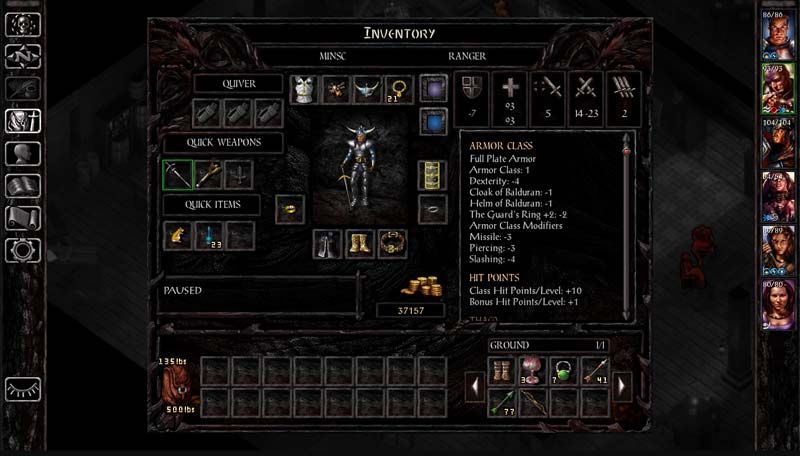
The Inventory Screen has a tweaked layout as discussed
here and using the graphics and functionality from
this mod by Lefreut.
This version, however, adds saving throws, resistances and status effects to the combat stats window, which should further minimize going back and forth between screens to check how equipped items affect characters.[/spoiler]
Optional: Revised Record Screen
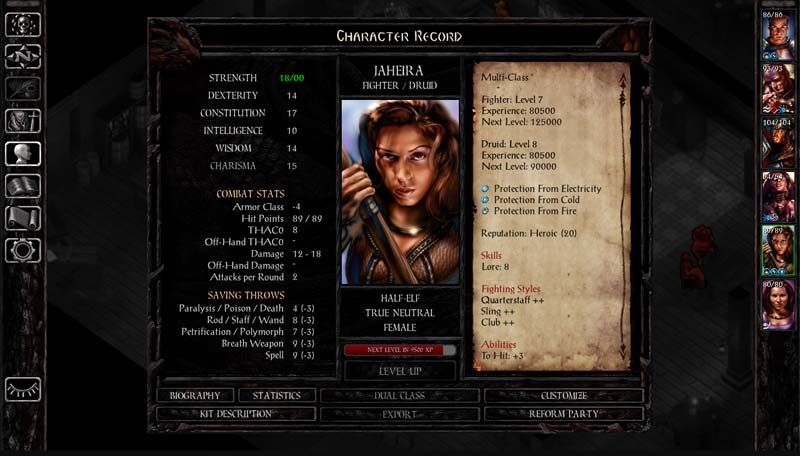
[spoiler]The Record Screen has been completely redesigned, undoing almost every (disastrous, IMHO) change made by patch 2.0. It's a slightly altered version of
Lefreut's Improved Record Screen, which didn't have a proper SoD version.
![image]()
Biography, Stats and Kit Description have their own screens again, the way Bhaal intended.[/spoiler]
Optional: Classic Spellbook
[spoiler]
![image]()
This component makes the Mage Book and Priest Scroll screens behave exactly like they did in the original BG and BG2 (also in the EEs prior to patch 2.0). There are
a few very good arguments as to why this is preferable to the new interface, but for those of you who don't agree, this has been kept completely optional.
The basis for this component's code was brought to you by the amazing Lefreut and is also available as a standalone mod compatible with BG:EE sans SoD and BG2:EE.[/spoiler]
Optional: Larger Ring Icons
[spoiler]
![image]()
This component ports over the ring icons from BG2:EE, which are larger, just like they were in the original games.[/spoiler]
Optional: Alternate Fonts
[spoiler]This component is a major overhaul of in-game fonts, bringing it closer to the original BG1.
![image]()
![image]()
![image]()
![image]()
Tooltips and floating text now have the same fonts as the gamelog and dialogue window, trading off a little readability for aesthetics.[/spoiler]
Installation
This is now a WeiDU mod. Download the attached file at the bottom of this post, extract it to your game folder, run CKUISOD.exe and follow the onscreen instructions.
Compatibility
This mod is compatible with Baldur's Gate: Siege of Dragonspear or Enhanced Edition Trilogy (if the SoD GUI optional component is installed).
(If you're playing either the GoG or Steam versions of the game, please install modmerge before modding your game.)
It's also supported by
EEUITweaks Mod Collection as long as you install this one first.
There's a slight compatibility issue with EEUITweaks and the component "Mr2150's Journal Fixes" - if you install this component, it will revert the Journal's close button to its original graphic. It won't break anything,
though, so don't worry about it.
Special Thanks
The WeiDU version of this mod was made possible by the hard work of AncientCowboy and I'm immensely thankful for it.
I'd also like to thank Lefreut and Pecca (whose code, artwork and feedback I have used) and Adul and AstroBryGuy for their feedback and insights.
Last but not least, thank you for checking out this mod. I hope you'll enjoy it. Needless to say, feedback and bug reports are always appreciated.
 1) The Bhaal logo has been restored as the Return to Game button, which now changes dynamically according to the campaign you're playing, so when playing SoD, you'll still see the original button with the dragon.
2) Buttons on the left sidebar bottom have been slightly repositioned. Clock/pause button is now centered.
3) The little white line on the bottom of the dialogue/gamelog window has been removed. I don't know what it was doing there in the first place.
4) There's a new button for the quickloot toggle.
5) More quickloot slots! There are now 4 extra quickloot slots for a total of 13.
6) Action bar buttons are now equidistant which makes things aesthetically more pleasing. Those buttons used to be grouped in clusters to mimic the distribution of a keyboard's function keys. It made perfect sense back in the day but that particular layout is not as used nowadays, so...
1) The Bhaal logo has been restored as the Return to Game button, which now changes dynamically according to the campaign you're playing, so when playing SoD, you'll still see the original button with the dragon.
2) Buttons on the left sidebar bottom have been slightly repositioned. Clock/pause button is now centered.
3) The little white line on the bottom of the dialogue/gamelog window has been removed. I don't know what it was doing there in the first place.
4) There's a new button for the quickloot toggle.
5) More quickloot slots! There are now 4 extra quickloot slots for a total of 13.
6) Action bar buttons are now equidistant which makes things aesthetically more pleasing. Those buttons used to be grouped in clusters to mimic the distribution of a keyboard's function keys. It made perfect sense back in the day but that particular layout is not as used nowadays, so...
 All parchment graphics have been replaced with a more saturated version. I'm not the only one who thought the color was a bit too muted. They also have the proper scrollbar now.
 Margins on the Mage Book and Priest Scroll screens were tweaked and are now a bit nicer to look at. This is for people who were sold on the new layout of these screens. For those who miss the old behavior, please keep reading.
 The journal has a new background graphic (offered by Pecca) and close button. I think now it's better integrated with the UI.
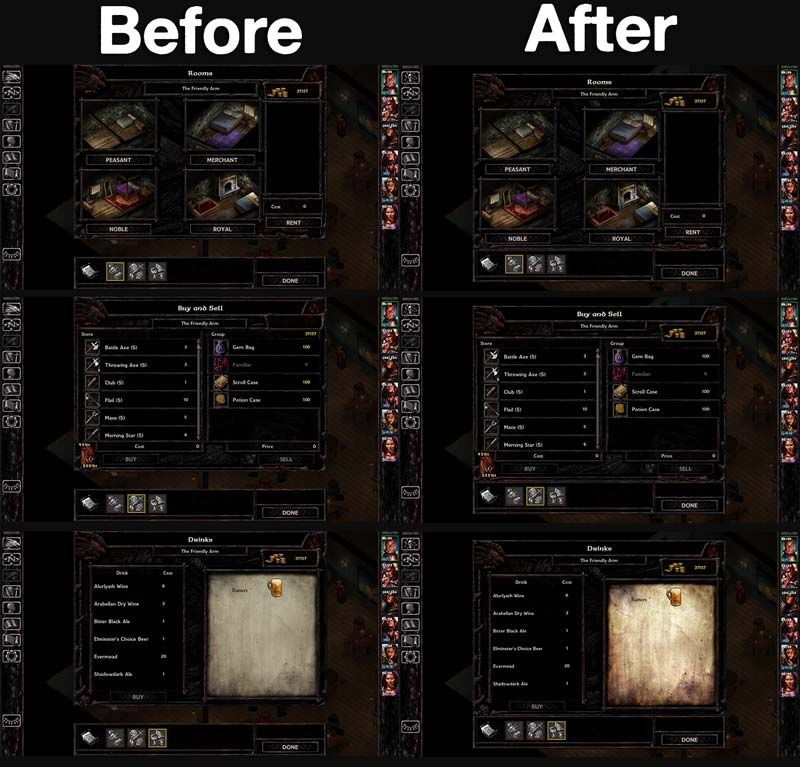 Store panels are properly joined. The headers are also consistent now.
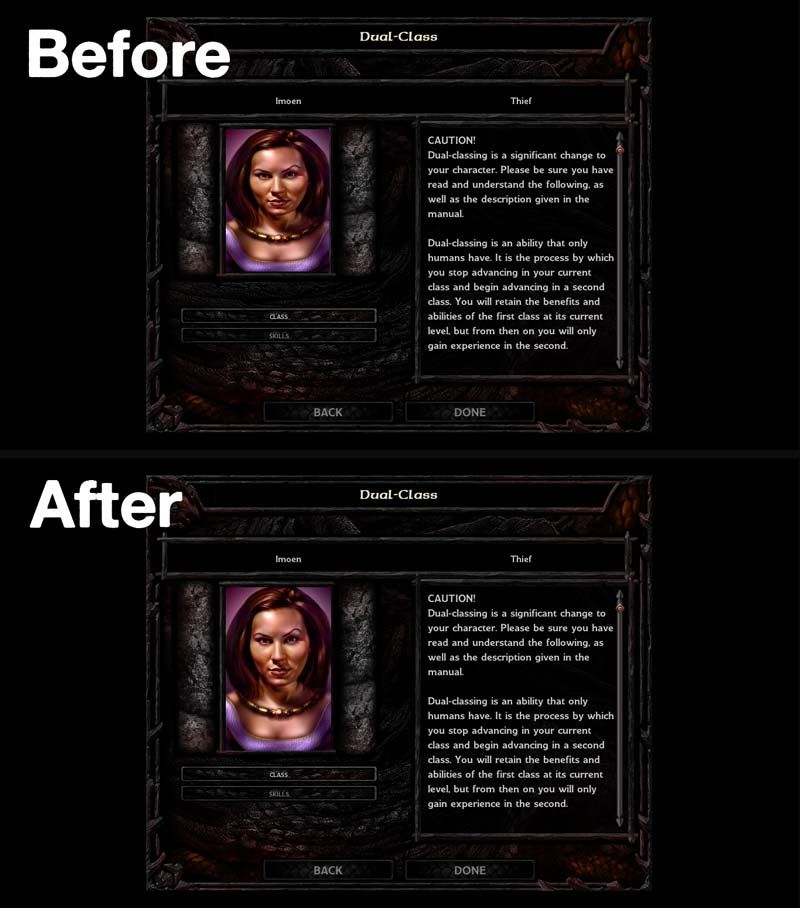 The Dual-Class screen portrait has had it's aspect ratio fixed. How that got past QA is beyond me.
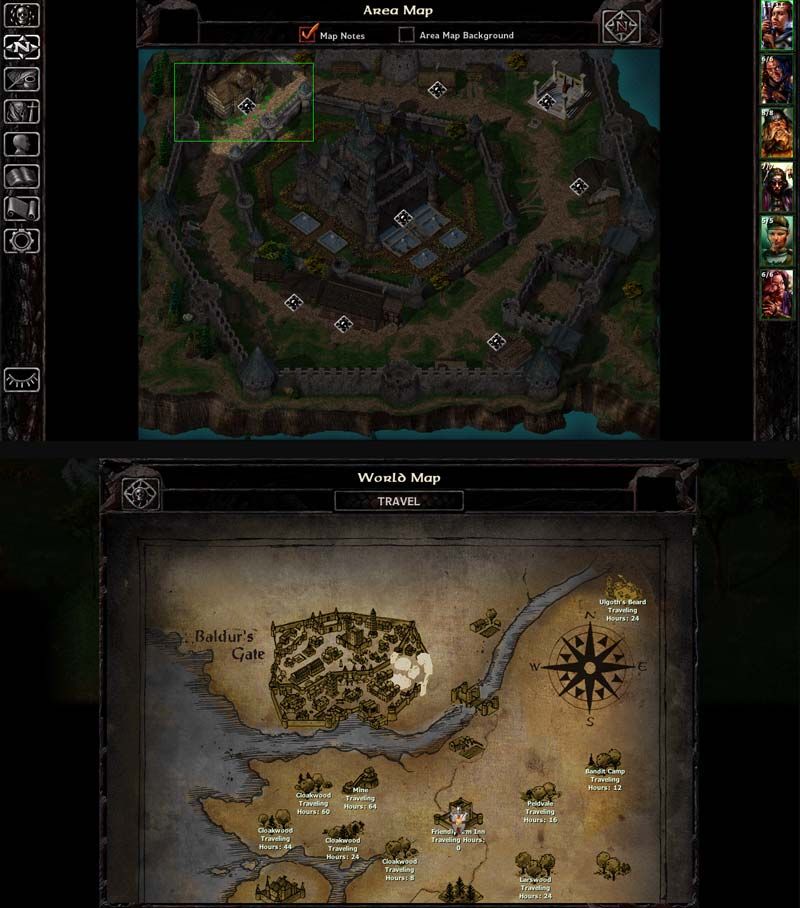 Area Map screen has a new graphic header. The World Map button has also been restored.
World Map also has a new header. Travel Button has been repositioned.
You may also have noticed the new desaturated/colored worldmap, with a few elements from the original BG1 brought back. It's still not perfect, but at least it's more consistent with SoD's worldmaps.
Area Map screen has a new graphic header. The World Map button has also been restored.
World Map also has a new header. Travel Button has been repositioned.
You may also have noticed the new desaturated/colored worldmap, with a few elements from the original BG1 brought back. It's still not perfect, but at least it's more consistent with SoD's worldmaps.
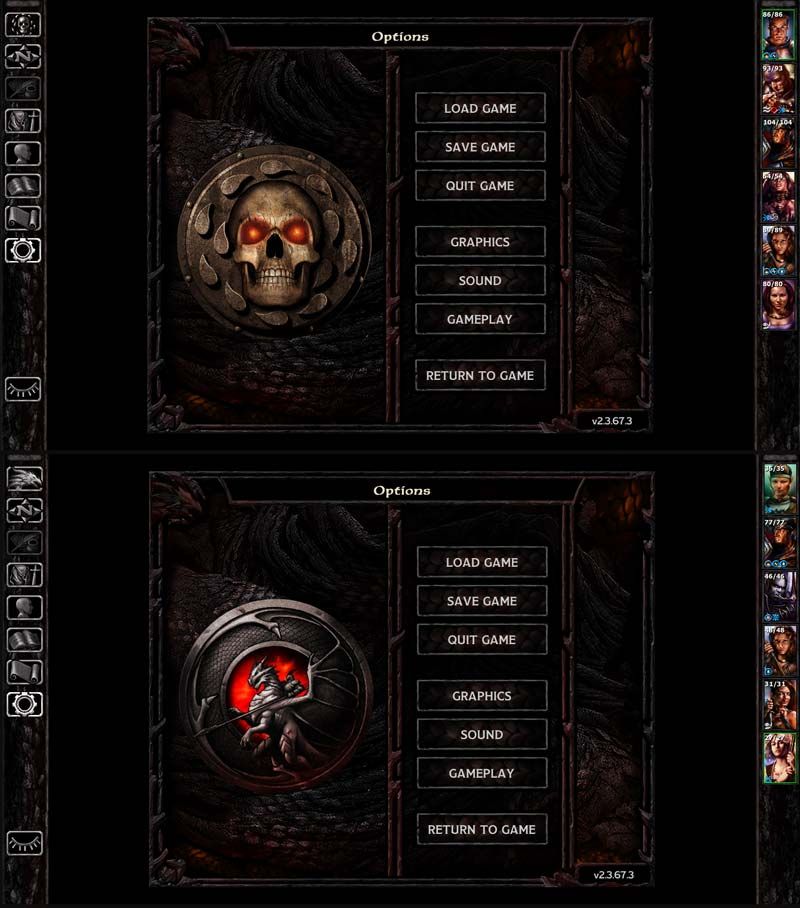 Redesigned Options Screen, including bigger buttons which have also been ported to the Start Menus.[/spoiler]
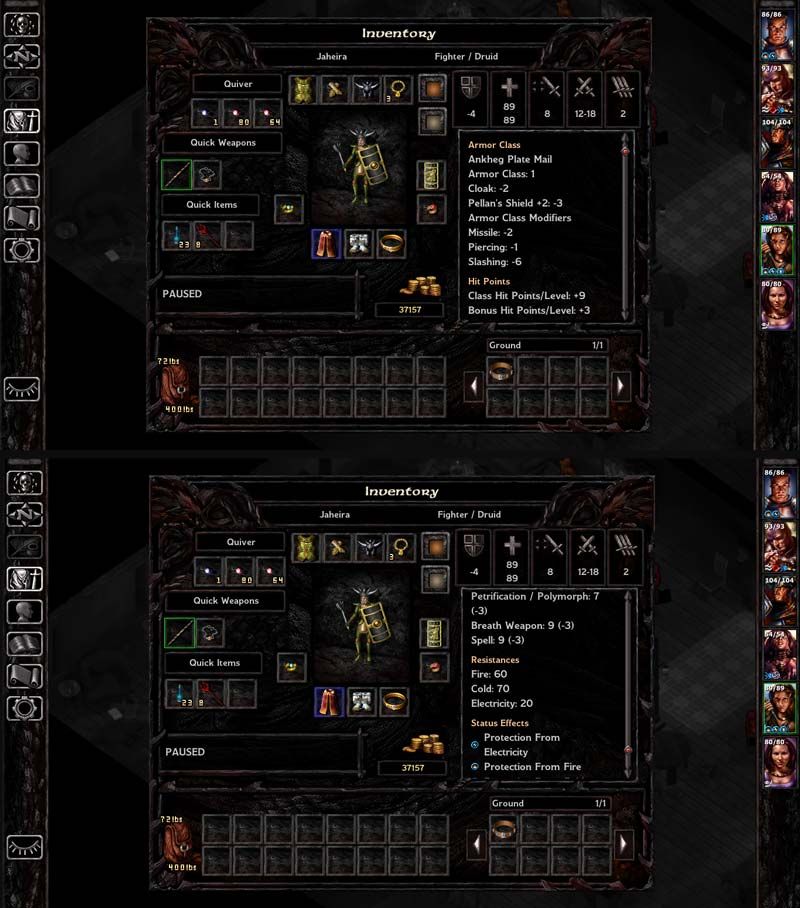 The Inventory Screen has a tweaked layout as discussed here and using the graphics and functionality from this mod by Lefreut.
This version, however, adds saving throws, resistances and status effects to the combat stats window, which should further minimize going back and forth between screens to check how equipped items affect characters.[/spoiler]
The Inventory Screen has a tweaked layout as discussed here and using the graphics and functionality from this mod by Lefreut.
This version, however, adds saving throws, resistances and status effects to the combat stats window, which should further minimize going back and forth between screens to check how equipped items affect characters.[/spoiler]
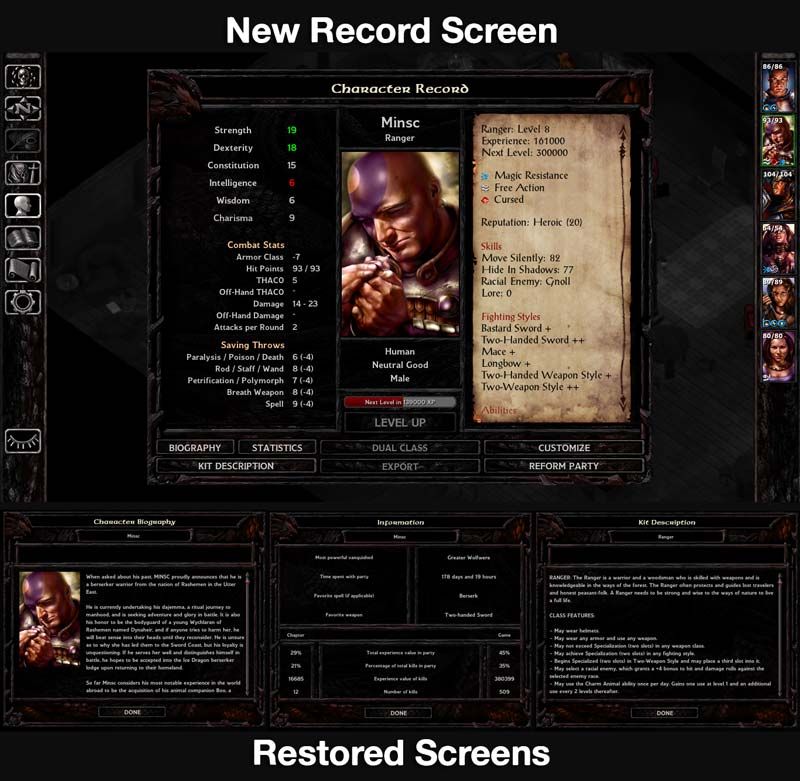 Biography, Stats and Kit Description have their own screens again, the way Bhaal intended.[/spoiler]
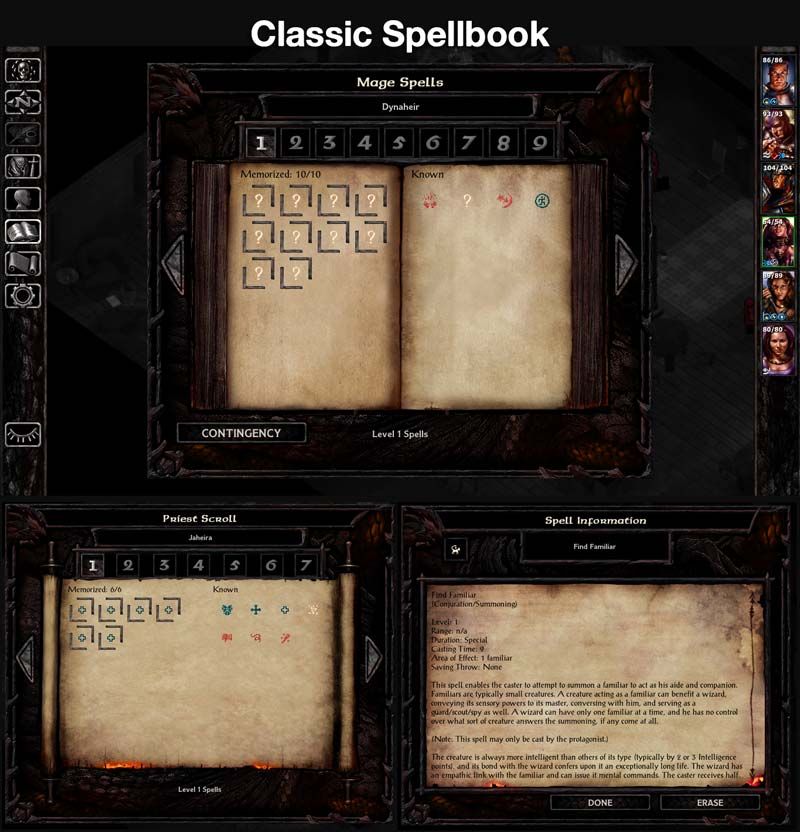 This component makes the Mage Book and Priest Scroll screens behave exactly like they did in the original BG and BG2 (also in the EEs prior to patch 2.0). There are a few very good arguments as to why this is preferable to the new interface, but for those of you who don't agree, this has been kept completely optional.
The basis for this component's code was brought to you by the amazing Lefreut and is also available as a standalone mod compatible with BG:EE sans SoD and BG2:EE.[/spoiler]
This component makes the Mage Book and Priest Scroll screens behave exactly like they did in the original BG and BG2 (also in the EEs prior to patch 2.0). There are a few very good arguments as to why this is preferable to the new interface, but for those of you who don't agree, this has been kept completely optional.
The basis for this component's code was brought to you by the amazing Lefreut and is also available as a standalone mod compatible with BG:EE sans SoD and BG2:EE.[/spoiler]
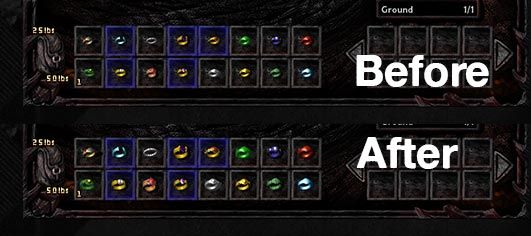 This component ports over the ring icons from BG2:EE, which are larger, just like they were in the original games.[/spoiler]
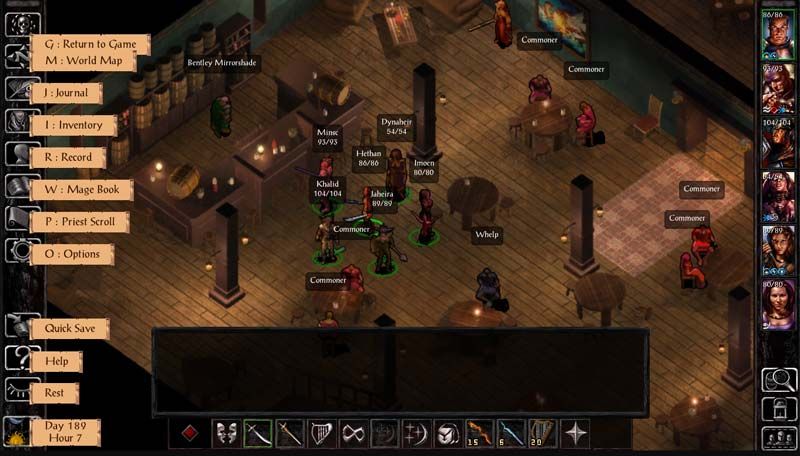
 Tooltips and floating text now have the same fonts as the gamelog and dialogue window, trading off a little readability for aesthetics.[/spoiler]


![Midge Ure – A Man of Two Worlds (2026) [Official Digital Download 24bit/96kHz]](http://imghd.xyz/images/2026/05/09/zvc67e2mth34l_600.jpg)





