With EEKeeper what are the DC options and limits? Can I create a Sorcy and dual him to a thief? I see you can only dual to a class that was able to dual in the vanilla rules. But can I create a Bard then dual him to a Cleric or Druid?
↧
EE Keeper and Dual Class options
↧
BG2EE > BG1EE ?¿ Engine functions.. please enlight me :)
Hello all!
I thought both Games shared the same engine functionality, oh silly me!")
Was going to some mod setup and request the "Disable Cosmetic Attacks" for BG1 as well but then it struck: Why the hell mod for BG1 if (provided) the features are inferior and somewhat limited compared to BG2?
I'm new here and logic (mine at least) suggest that the games would "roll out" in the same fashion as BGT for vanilla versions (use superior engine to play all the games cause... theres no reason NOT TO). I dunno if developers have some conceptual or contractual or any other bulls.. I mean 'reason' for making BG1 with its limitations.. but then there it is.
Before I "dirt my hands" and start some topics or mods, can someone whos been down the road for a while longer enlighthen me as to, quite frankly, if theres any sensible reason to mod for BG1 (other than fanatical preference for it over BG2) or should I just wait until someone (fast, please!) makes a "Trilogy" like done with vanilla games and ports BG1EE to the functionality of its big brother the BG2EE.
Thanks for any insight on that!
I thought both Games shared the same engine functionality, oh silly me!

Was going to some mod setup and request the "Disable Cosmetic Attacks" for BG1 as well but then it struck: Why the hell mod for BG1 if (provided) the features are inferior and somewhat limited compared to BG2?
I'm new here and logic (mine at least) suggest that the games would "roll out" in the same fashion as BGT for vanilla versions (use superior engine to play all the games cause... theres no reason NOT TO). I dunno if developers have some conceptual or contractual or any other bulls.. I mean 'reason' for making BG1 with its limitations.. but then there it is.
Before I "dirt my hands" and start some topics or mods, can someone whos been down the road for a while longer enlighthen me as to, quite frankly, if theres any sensible reason to mod for BG1 (other than fanatical preference for it over BG2) or should I just wait until someone (fast, please!) makes a "Trilogy" like done with vanilla games and ports BG1EE to the functionality of its big brother the BG2EE.
Thanks for any insight on that!
↧
↧
Anyone interested if I made this NPC a party member (spoilers for SoA)
Sime.
As a foreword, I'm going to be very open with the ideas I have for this character. No secrets here, unless I haven't fully figured it out yet. If I think it's a good idea, I'll mention it.
We don't see much of Sime past Brynnlaw, other than with Quest Pack installed in which case she gets a rather miserable fate. A random idea came into my head some time ago and given some time to develop, I think I've got something that could become an interesting NPC mod.
Race: Elf
Class: Mage/Thief
Alignment: Lawful Neutral/True Neutral
Basically, the idea is to retcon Sime into an elf, not that this matters much considering her race is never mentioned anyway. Since she has the mysterious ability to Dimension Door in vanilla, I don't feel bad about her becoming a Mage/Thief.
Instead of being a true Shadow Thief, she is in fact an agent of Suldanessellar (based off Rogue Rebalancing but past this is my own idea). Aran sends her off to Brynnlaw with you under the pretense of spying on Saemon, but in fact had sniffed a rat and sent her off with you both to get her off him and in hopes that you'll be able to figure out what she's up to, considering he at least somewhat trusts you by now. Little does he know that it was exactly what Sime wanted as her goal was to reach Spellhold to find Irenicus.
She knows everything about Irenicus and his past, but won't tell you since she doesn't trust you. Throughout Spellhold and optionally City-of-Caverns you'll have plenty of opportunities to suspect her of being a double agent for Aran (which would obviously be false) but she can't give you any information either on him nor her real masters since her mission is confidential.
She'll have important dialogue with Aran, Elhan, Demin and some with Ellesime as well. Probably a small quest in Athkatla and something extra in Suldanessellar as well.
Brainstormed ideas:
- Returning to the Shadow Thief guild after Spellhold. Aran drops the charade and admits he tried to drop Sime on you, revealing he knows Sime is a spy in the process. Misunderstandings get settled, Aran still isn't happy so he tells Sime to help you get rid of Bodhi to regain his trust. This will just be one long dialogue/argument.
- Some tension between Sime and Elhan. Possibly a private conversation which the PC has the option of eavesdropping on (not sure about this considering how alert elves are) which gives you a few hints on why Sime was sent to Athkatla, with Elhan telling Sime to keep her yap shut with you at the end.
- Some issue with Shadow Thief unfinished business in Athkatla as a post-Underdark quest
- Family rescue (those two elves in the southeast house) mini-encounter in Suldanessellar
- The usual occasional interjection. I have an idea for a really funny one with Coran if you can save him.
- Possibility to rat Sime out to Aran for a reward. Sime's not going to be impressed by it though.
Thoughts? Comments? Ideas?
As a foreword, I'm going to be very open with the ideas I have for this character. No secrets here, unless I haven't fully figured it out yet. If I think it's a good idea, I'll mention it.
We don't see much of Sime past Brynnlaw, other than with Quest Pack installed in which case she gets a rather miserable fate. A random idea came into my head some time ago and given some time to develop, I think I've got something that could become an interesting NPC mod.
Race: Elf
Class: Mage/Thief
Alignment: Lawful Neutral/True Neutral
Basically, the idea is to retcon Sime into an elf, not that this matters much considering her race is never mentioned anyway. Since she has the mysterious ability to Dimension Door in vanilla, I don't feel bad about her becoming a Mage/Thief.
Instead of being a true Shadow Thief, she is in fact an agent of Suldanessellar (based off Rogue Rebalancing but past this is my own idea). Aran sends her off to Brynnlaw with you under the pretense of spying on Saemon, but in fact had sniffed a rat and sent her off with you both to get her off him and in hopes that you'll be able to figure out what she's up to, considering he at least somewhat trusts you by now. Little does he know that it was exactly what Sime wanted as her goal was to reach Spellhold to find Irenicus.
She knows everything about Irenicus and his past, but won't tell you since she doesn't trust you. Throughout Spellhold and optionally City-of-Caverns you'll have plenty of opportunities to suspect her of being a double agent for Aran (which would obviously be false) but she can't give you any information either on him nor her real masters since her mission is confidential.
She'll have important dialogue with Aran, Elhan, Demin and some with Ellesime as well. Probably a small quest in Athkatla and something extra in Suldanessellar as well.
Brainstormed ideas:
- Returning to the Shadow Thief guild after Spellhold. Aran drops the charade and admits he tried to drop Sime on you, revealing he knows Sime is a spy in the process. Misunderstandings get settled, Aran still isn't happy so he tells Sime to help you get rid of Bodhi to regain his trust. This will just be one long dialogue/argument.
- Some tension between Sime and Elhan. Possibly a private conversation which the PC has the option of eavesdropping on (not sure about this considering how alert elves are) which gives you a few hints on why Sime was sent to Athkatla, with Elhan telling Sime to keep her yap shut with you at the end.
- Some issue with Shadow Thief unfinished business in Athkatla as a post-Underdark quest
- Family rescue (those two elves in the southeast house) mini-encounter in Suldanessellar
- The usual occasional interjection. I have an idea for a really funny one with Coran if you can save him.
- Possibility to rat Sime out to Aran for a reward. Sime's not going to be impressed by it though.
Thoughts? Comments? Ideas?
↧
BG2 Redux : Athkatla - DA Mod - Irenicus!
Hello everyone -
Thought I would post a video to get everyone even more exited about BG:EE coming out soon. I have been working on a mod to bring BG2 into the DA engine. Our cinematic designer @DahliaLynn has just completed the opening cutscene for Module 2 and we have made it public.
![image]()
Its a tedious long process to recreate each area in 3D, but nearly finished with the entire city now. Just the Graveyard catacombs to finish and finalize the slums night version. If this thread shows interest, will post some shots of that stuff.
Here are the credits involved in this scene:
@Cuv: BGR Module 2 Project Lead/Level Design
@DahliaLynn: Module 2 Opening Cinematic Designer
@Ablaine : Character/Organic Lead Modeller
@DarthParametric : Environment/Level Lead Modeller
@Piet: Environmental Modeller/Textures
Cuv
Thought I would post a video to get everyone even more exited about BG:EE coming out soon. I have been working on a mod to bring BG2 into the DA engine. Our cinematic designer @DahliaLynn has just completed the opening cutscene for Module 2 and we have made it public.

Its a tedious long process to recreate each area in 3D, but nearly finished with the entire city now. Just the Graveyard catacombs to finish and finalize the slums night version. If this thread shows interest, will post some shots of that stuff.
Here are the credits involved in this scene:
@Cuv: BGR Module 2 Project Lead/Level Design
@DahliaLynn: Module 2 Opening Cinematic Designer
@Ablaine : Character/Organic Lead Modeller
@DarthParametric : Environment/Level Lead Modeller
@Piet: Environmental Modeller/Textures
Cuv
↧
Larger Parties, Garrisons! [Now with Drawings!]
I have this idea:
-Larger party option with more difficultly / scaled encounters for revisited play-throughs (after beating the game once).
-Garrison Management for settlements and fortified areas. (Think inventory and side quests but for the town's garrison).
Joe Bob the Fighter staring in: Garrison 'Management' Interface sketch that I made on the 2014 holidays (Post Christmas):
![image]()
[Yes I know, Bad quality Image and messy writing.. (Notorious with Teachers)]
What do you think? (I have also created an [in-depth] algorithm for Garrison N.P.C. generation).
-Larger party option with more difficultly / scaled encounters for revisited play-throughs (after beating the game once).
-Garrison Management for settlements and fortified areas. (Think inventory and side quests but for the town's garrison).
Joe Bob the Fighter staring in: Garrison 'Management' Interface sketch that I made on the 2014 holidays (Post Christmas):
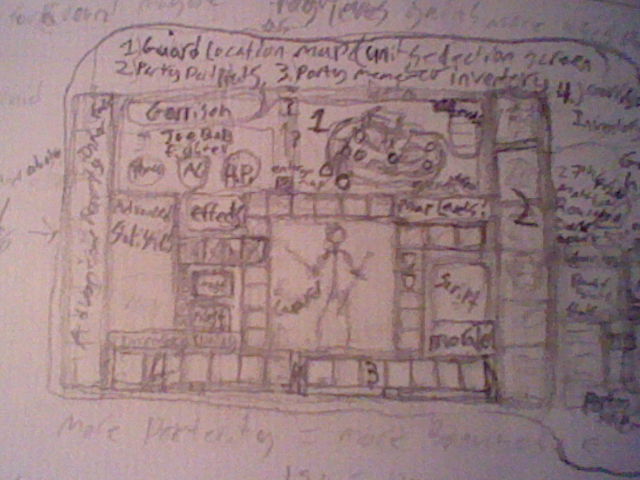
[Yes I know, Bad quality Image and messy writing.. (Notorious with Teachers)]
What do you think? (I have also created an [in-depth] algorithm for Garrison N.P.C. generation).
↧
↧
Kit differences in HLA onset
I apologize if this has been answered before. I am making some kit mods that I am planning on posting for the community to use. I want one of my kits to have an earlier onset of gaining high level abilities than the base class. I have tried adding my kit to the LUNUMAB.2DA file with the new lower level, but no dice. IESDP suggests that kits can be used in this file in addition to base classes, so I am likely doing something incorrectly. I am grateful for any assistance.
Thank you,
K
Thank you,
K
↧
A Frosty Journey: The IWDEE Kitpack
A Frosty Journey: The IWDEE Kitpack
Features
- 33 new kits. With more on the way!
- Additional dialogue between an Icepriest of Auril character and Lysan (as well as a few other characters like Hrothgar).
- Unique biographies and kit colours for each kit.
Fighter Kits
- Breachgnome
- Mercenary
- Myrmidon
- Tunnelrat
Ranger kits
- Giant Killer
Paladin kits
- Divinate of Mystra
- Divinate of Mielekki
- Divinate of Ilmater
Monk Kits
- Brother or Sister of the Pure Flame (Kossuth - Lawful Neutral)
- Child of the Passive Voice (Oghma)
- Disciple of the Changeless Face (Grumbar)
- Disciple of the Phoenix (Kossuth - Lawful Good)
- Disciple of the Salamander (Kossuth - Lawful Evil)
- Disciple of the White Rod (Loviatar)
- Disciple of the Yielding Way (Eldath)
- Monk of the Old Order (no deity)
- Monk of the Order of the Long Death (no deity)
- Monk of the Shimmering Wind (Akadi)
- Monk of the Shining Hand (Azuth)
- Monk of the Weeping Friars (Ilmater)
- Zealot of the Written Word (Deneir)
Thief kits
- Mouseburglar
- Pest Controller
- Scout
- Tumbler
- Vermin Slayer
Cleric kits
- Earthwalker of Grumbar
- Shaman of Gruumsh
- Priest of Luthic
- Icepriestess of Auril
- Iceguardian of Uluntiu
- Leaftender
Druid kits
- Hivemaster
Download Link
You can download it here
http://www.shsforums.net/files/file/1099-a-frosty-journey-the-iwdee-kitpack/
Compatibility
Provided you don't use the "Cleric Kit Penalties" and "Druid Kit Penalties" components this kitpack should be compatible with other mods.
Bug Reporting: Though I was sure to test each of them it is entirely possible that these kits could have bugs. If you do experience kit or spell specific bugs feel free to report them here. Also don't be using this mod when making any bug reports to Overhaul.
With all that in mind you can find more details about the kits in the next few posts below.
Special Thanks
CrevsDaak - For his kit mod instructions. This wouldn't be possible if those hadn't been written. If you haven't seen it check it out here.
http://forum.baldursgate.com/discussion/34119/how-to-making-kit-mods-for-the-ee/p1
(Also for help with figuring out how dialogue works)
Overhaul/Camdawg - For all their work on IWDEE. Camdawg in particular since I took advantage of some leftover 2DA work for the Priest of Tempus to figure out how to not just grant spells but also base it off of alignment.
Wisp - and anyone else involved with Weidu updating.
Argent77 - For all the work put into Near Infinity. I found it to be tremendously helpful here.
Isaya For help figuring out dialogue.
Features
- 33 new kits. With more on the way!
- Additional dialogue between an Icepriest of Auril character and Lysan (as well as a few other characters like Hrothgar).
- Unique biographies and kit colours for each kit.
Fighter Kits
- Breachgnome
- Mercenary
- Myrmidon
- Tunnelrat
Ranger kits
- Giant Killer
Paladin kits
- Divinate of Mystra
- Divinate of Mielekki
- Divinate of Ilmater
Monk Kits
- Brother or Sister of the Pure Flame (Kossuth - Lawful Neutral)
- Child of the Passive Voice (Oghma)
- Disciple of the Changeless Face (Grumbar)
- Disciple of the Phoenix (Kossuth - Lawful Good)
- Disciple of the Salamander (Kossuth - Lawful Evil)
- Disciple of the White Rod (Loviatar)
- Disciple of the Yielding Way (Eldath)
- Monk of the Old Order (no deity)
- Monk of the Order of the Long Death (no deity)
- Monk of the Shimmering Wind (Akadi)
- Monk of the Shining Hand (Azuth)
- Monk of the Weeping Friars (Ilmater)
- Zealot of the Written Word (Deneir)
Thief kits
- Mouseburglar
- Pest Controller
- Scout
- Tumbler
- Vermin Slayer
Cleric kits
- Earthwalker of Grumbar
- Shaman of Gruumsh
- Priest of Luthic
- Icepriestess of Auril
- Iceguardian of Uluntiu
- Leaftender
Druid kits
- Hivemaster
Download Link
You can download it here
http://www.shsforums.net/files/file/1099-a-frosty-journey-the-iwdee-kitpack/
Compatibility
Provided you don't use the "Cleric Kit Penalties" and "Druid Kit Penalties" components this kitpack should be compatible with other mods.
Bug Reporting: Though I was sure to test each of them it is entirely possible that these kits could have bugs. If you do experience kit or spell specific bugs feel free to report them here. Also don't be using this mod when making any bug reports to Overhaul.
With all that in mind you can find more details about the kits in the next few posts below.
Special Thanks
CrevsDaak - For his kit mod instructions. This wouldn't be possible if those hadn't been written. If you haven't seen it check it out here.
http://forum.baldursgate.com/discussion/34119/how-to-making-kit-mods-for-the-ee/p1
(Also for help with figuring out how dialogue works)
Overhaul/Camdawg - For all their work on IWDEE. Camdawg in particular since I took advantage of some leftover 2DA work for the Priest of Tempus to figure out how to not just grant spells but also base it off of alignment.
Wisp - and anyone else involved with Weidu updating.
Argent77 - For all the work put into Near Infinity. I found it to be tremendously helpful here.
Isaya For help figuring out dialogue.
↧
EE Keeper, Updated to v1.0.2
At the suggestion of @Dee, this thread will be used to post updates (as and when I have time), looking into bug reports, and a host of other things.
The program can be found on SourceForge (link below), and this post will be updated with links when a new version is ready. Some details of usage can be found within the Wiki on the Keeper SourceForge page). If people have free time, feel free to add to it for the benefit of others.
Unless otherwise stated, an archive unpacker will be required in order to open the RAR archive.
The source code for EE Keeper can be found here. The Visual Studio solution is for VS2012, so you will need that in order to do anything (or you could make a quick edit to the solution so it will load in older versions).
![image]() EE Keeper* uses MFC (Microsoft Foundation Class), which means that you will need a standard version of Visual Studio, rather than an express version. Even if you don't, but you have programming knowledge and would like to help, then over the course of the next few months the plan I have is to convert all the code to be Unicode friendly. The second part of the plan is to convert to Win32 or (better yet) use Qt or wxWidgets to make it cross-platform friendly. Either way, feel free to post your coding suggestions. I will also be taking suggestions, but please keep them realistic. I don't have a lot of time to spare on this project and so any suggestions will likely take weeks or months to implement; keep them short and sweet, modifications to the UI, tweaks, etc.
EE Keeper* uses MFC (Microsoft Foundation Class), which means that you will need a standard version of Visual Studio, rather than an express version. Even if you don't, but you have programming knowledge and would like to help, then over the course of the next few months the plan I have is to convert all the code to be Unicode friendly. The second part of the plan is to convert to Win32 or (better yet) use Qt or wxWidgets to make it cross-platform friendly. Either way, feel free to post your coding suggestions. I will also be taking suggestions, but please keep them realistic. I don't have a lot of time to spare on this project and so any suggestions will likely take weeks or months to implement; keep them short and sweet, modifications to the UI, tweaks, etc.
*Since EE Keeper seems to be the widely accepted name, that's what it is called officially. However, anyone can call it whatever they like.
Mac This is a big question for a lot of people. The answer is that it is not officially supported. Some trials on Mac via Wineskin, by @Nifft, have been done and it seems to work, depending on the version - it will be up to others to help with that should any issues arise. More details here. @AstroBryGuy, has recently started creating wrappers for new versions of EE Keeper. Please note that a new wrapped version will be released behind the Windows version; it requires that he gets the latest version and then create and upload a wrapper. For future builds I will be submitting one to him sooner so that he can have it wrapped and uploaded in conjunction with the Windows release.
Linux Though not ideal, Keeper works with the use of Wine and it functions well enough. To load different languages, environmental variables may need to be set; e.g. Exec=env LC_ALL=zh_CN.UTF-8 WINEPREFIX="[location of wine]" wine '[location of file]'.
Windows The current version, 1.0.2.4, should work on everything from XP to Windows 8. If you encounter a problem, please see the details below on reporting it any problems you find.
As a final note: just because a new thread is made, and the release is more of a Live/REL version, it doesn't mean that the program is bug free, nor does it mean that I won't be tweaking it any more (I will). If you come across any issues, or you are in doubt over something, feel free to post and either myself of some other helpful community member will try to help overcome it. If you find something, and you're certain that it's a bug (i.e. portraits not displaying when they should), feel free to create a ticket for it here. If the ticket is not a bug, but a misunderstanding, then it will be moderated as such. Feature requests can also be made, just set the 'Report Type' option to 'Feature Request'. When trying to bring a bug to my attention, please specify what platform you are using (Mac or Windows) and exactly what you are or were trying to do at the time of the bug.
Obviously, like any program, there are testers. If you've tested this to make sure it works in a trial stage, you'll be listed here. If you're not listed here (I may have simply forgotten), send me a PM and you'll get added.
Download
The program can be found on SourceForge (link below), and this post will be updated with links when a new version is ready. Some details of usage can be found within the Wiki on the Keeper SourceForge page). If people have free time, feel free to add to it for the benefit of others.
Unless otherwise stated, an archive unpacker will be required in order to open the RAR archive.
The source code for EE Keeper can be found here. The Visual Studio solution is for VS2012, so you will need that in order to do anything (or you could make a quick edit to the solution so it will load in older versions).
| v1.0.1 | Download |
| v1.0.2 | Download |
| v1.0.2.1 | Download |
| SFX installer | |
| Mac Wineskin Wrapper | |
| v1.0.2.2 | Download |
| SFX installer | |
| Mac Wineskin Wrapper | |
| v1.0.2.3 | Download |
| SFX installer | |
| Mac Wineskin Wrapper | |
| v1.0.2.4 | Download |
| SFX installer | |
| Mac Wineskin Wrapper | |
| v1.0.2.5 | Download |
| SFX installer | |
| v1.0.2.6 | Download |
| SFX installer | |
| Mac Wineskin Wrapper |
Info
 EE Keeper* uses MFC (Microsoft Foundation Class), which means that you will need a standard version of Visual Studio, rather than an express version. Even if you don't, but you have programming knowledge and would like to help, then over the course of the next few months the plan I have is to convert all the code to be Unicode friendly. The second part of the plan is to convert to Win32 or (better yet) use Qt or wxWidgets to make it cross-platform friendly. Either way, feel free to post your coding suggestions. I will also be taking suggestions, but please keep them realistic. I don't have a lot of time to spare on this project and so any suggestions will likely take weeks or months to implement; keep them short and sweet, modifications to the UI, tweaks, etc.
*Since EE Keeper seems to be the widely accepted name, that's what it is called officially. However, anyone can call it whatever they like.
Compatibility
Mac This is a big question for a lot of people. The answer is that it is not officially supported. Some trials on Mac via Wineskin, by @Nifft, have been done and it seems to work, depending on the version - it will be up to others to help with that should any issues arise. More details here. @AstroBryGuy, has recently started creating wrappers for new versions of EE Keeper. Please note that a new wrapped version will be released behind the Windows version; it requires that he gets the latest version and then create and upload a wrapper. For future builds I will be submitting one to him sooner so that he can have it wrapped and uploaded in conjunction with the Windows release.
Linux Though not ideal, Keeper works with the use of Wine and it functions well enough. To load different languages, environmental variables may need to be set; e.g. Exec=env LC_ALL=zh_CN.UTF-8 WINEPREFIX="[location of wine]" wine '[location of file]'.
Windows The current version, 1.0.2.4, should work on everything from XP to Windows 8. If you encounter a problem, please see the details below on reporting it any problems you find.
As a final note: just because a new thread is made, and the release is more of a Live/REL version, it doesn't mean that the program is bug free, nor does it mean that I won't be tweaking it any more (I will). If you come across any issues, or you are in doubt over something, feel free to post and either myself of some other helpful community member will try to help overcome it. If you find something, and you're certain that it's a bug (i.e. portraits not displaying when they should), feel free to create a ticket for it here. If the ticket is not a bug, but a misunderstanding, then it will be moderated as such. Feature requests can also be made, just set the 'Report Type' option to 'Feature Request'. When trying to bring a bug to my attention, please specify what platform you are using (Mac or Windows) and exactly what you are or were trying to do at the time of the bug.
Credits
Obviously, like any program, there are testers. If you've tested this to make sure it works in a trial stage, you'll be listed here. If you're not listed here (I may have simply forgotten), send me a PM and you'll get added.
| @AstroBryGuy | Maintainer of the Mac Wineskin version. |
| @Mikaal | Testing |
| @Heas | Testing |
| @mlnevese | Testing |
| @Nifft | Testing |
| @CrevsDaak | Testing |
| @swnmcmlxi | Testing |
| @Dee | Testing |
| @AHF | Testing |
| @Pibaro | Testing, Italian Translation |
| @Davide | Testing, Italian Translation |
| @silver_gp | Chinese Translation |
| @Teflon | Korean Translation |
| @Isaya | Testing, French Translation |
| @Kunikos | Testing |
| @Anton | Testing |
| @ermo | Testing |
| @Erg | Testing |
| @mattinm | Work on the Qt version so as to natively support other platforms. |
↧
[MOD] "Beta" 38 Subraces for BG:EE - 0.87 - Updated - 3/11/2013
Per the previous thread;
http://forum.baldursgate.com/discussion/16284/custom-races-mod#latest
Here is a Beta of a sub-race kit. If you want an Elf subrace start with Elf. If you want a Dwarf subrace start with ....
(you get it).
///////////////////////////////
Download link
http://www40.zippyshare.com/v/36136047/file.html
.76 - Added some spells (need tweaking still)
.77 - Spelling Corrections
.78 - Change "Spectacles of the Underdark" to "Darkdwellers Ring".
Added Reputation bonuses/penalties (see below).
Updated Dialog per @mars0124 (thanks so much)!!
.85 - Too many changes to list, it's a complete re-write.
a huge thanks to @LavaDelVortel for balancing ideas.
.86 - Updated DLG to include all possible classes for Aasimar.
.87 - Some bug-fixes, and added 10 new sub-races for Half-Orc.
///////////////////////////////
There is a Wizard "Innesdav" waiting outside the Candlekeep Inn to expose your hidden subrace. He will ask you some questions (answers are in this post next to each subrace name), and then cast the Spell of Origins and reveal your race.
For the Light Blind races you will suffer -2 DEX and -2 AC and reduced visual range while in daylight. While in a cave or at night these penalties are removed. There is an option during the dialog to take a ring or a set of spectacles to remove this penalty but you will lose the equipment slot as the items are not movable.
The Avariel has wings that take the helmet slot. If you choose to have wings on your Aasimar it will convert the animation to an Elf and then the wings take the helmet slot. (Animation only works on Elfs).
Credit to "Moinesse" for the Wings, and the Ion Stone animations.
Here are the subraces available.
XXXXXXXXXXXXXXXXXXXXXXXXXX
HUMANS
XXXXXXXXXXXXXXXXXXXXXXXXXX
Aasimar - Celestial
Bonuses:
15% Cold Resistance
15% Fire Resistance
15% Acid Resistance
Infravision
+1 Reputation Adjustment
1/day May cast "Light" damaging one creature as per the table below, w/40% chance to Blind.
Level 1-3 1d4+1
Level 4-7 2d4+2
Level 8+ 2d6+2
(Change skin color to Gold)
Penalties:
-10% XP
///////////////////////////////
Tiefling - Infernal
Bonuses:
15% Cold Resistance
15% Electricity Resistance
15% Fire Resistance
10% Hide in Shadow
Infravision
1/day May cast "Blindness" (70% chance to blind target)
(Change skin color to Brown)
Penalties:
-1 Reputation
-10% XP
///////////////////////////////
Deep Imaskari - Underdark
Bonuses:
+1 Casting level
Infravision
1/day May cast "Magic Impulse" (Level 1 Magic Missle)
(Change skin color to Marble)
Penalties:
Lightblind
-5% Thief abilities
///////////////////////////////
Firesoul Genasi - Plane of Fire
Bonuses:
+50% Resistance to Fire
1/day cast "Burning Hands"
(Change skin color Orange and hair to Red)
Penalties:
-30% Cold Resistance
-1 Reputation
///////////////////////////////
Earthsoul Genasi - Plane of Earth
Bonuses:
+10% Resistance to Slashing
1/day cast "Create Gem" creates 1 gem
(Change skin color Brown and hair to Dark Brown)
Penalties:
-10% Resistance to Crushing
///////////////////////////////
Stormsoul Genasi - Plane of Storm
Bonuses:
+35% Resistance to Electricity
1/day cast "Call Lightning"
(Change skin color Light Purple and hair to Light Blue)
Penalties:
-10% Fire and Cold Resistance
-1 Reputation
///////////////////////////////
Watersoul Genasi - Plane of Water
Bonuses:
+30% Resistance to Cold
1/day cast "Freeze" Slow enemy w/50% chance to do 1d4+1 damage.
(Change skin color Light Blue and hair to Dark Blue)
Penalties:
-15% Resistance to Fire and Electricity
///////////////////////////////
Windsoul Genasi - Plane of Wind
Bonuses:
+10% Resistance to Cold
1/day cast "Wind" 80% chance to know down an enemy for 1 round.
+5% Physical Resistance
(Change skin color to Blue and Hair to White/Grey)
Penalties:
-1 Damage
+5% Magical Damage
///////////////////////////////
Pureblood Yuan-Ti - Pit of Vipers
Bonuses:
Immune to Poison
1/day May shapshift into a Giant Snake.
1/day Poison Weapon
+1 AC Bonus (Scales)
(Change skin color to Dark Green)
Penalties:
-20% XP
-1 Reputation
(Evil only)
///////////////////////////////
Githyanki - Astral Sea
Bonuses:
1/day cast Dimension Door
1/day cast Command (as Priest spell)
1/day cast Silver Strike: 1d6+1 Extra Damage removes Invisibility from target.
Infravision
15% Magic Resistance
(Change skin color to Pale White)
Penalties:
-2 Reputation
-15% XP
///////////////////////////////
Githzerai - Elemental Chaos
Bonuses:
+1 AC
1/day cast Armor
1/day cast Ring the Golden Bell: Stunning Blow.
Infravision
15% Magic Resistance
(Change skin color to Pale White)
Penalties:
-1 Reputation
-15% XP
XXXXXXXXXXXXXXXXXXXXXXXXXX
HALF-ELVES
XXXXXXXXXXXXXXXXXXXXXXXXXX
Half-Drow - Underdark
Bonuses:
+2 Saving throw vs Spells
Infravision
(Change skin color to Light Purple)
Penalties:
-1 Reputation
///////////////////////////////
Fey'ri - Infernal
Bonuses:
15% Fire Resistance
Infravision
(Change skin color to Brown and hair to Dark Brown)
Penalties:
-1 Reputation
XXXXXXXXXXXXXXXXXXXXXXXXXX
ELVES
XXXXXXXXXXXXXXXXXXXXXXXXXX
Drow - Underdark
Bonuses:
+2 Saving Throws vs. Spells
25% Magic Resistance
2/day Faerie Fire (dispel invisibility, and +5% chance cause fear)
(Change skin color to Purple and hair to White)
Penalties:
-2 Reputation
-15% XP
Lightblind
///////////////////////////////
Moon Elf - Elf City
Bonuses:
+5 Lore
(Change skin color to Gray and hair to Blue)
Penalties:
None
///////////////////////////////
Wild Elf - Deep Woods
Bonuses:
+1 Thac0 w/ranged weapons (2 total)
(Change skin color to Brown and hair color to Green)
Penalties:
-5 Lore
///////////////////////////////
Avariel - Clouds
Bonuses:
1/day May use "Take Flight" (Dimension Door)
1/day May use "Charming Voice" (Charm person)
(Change skin color to Pale White and hair color to Black)
Penalties:
-1HP per level
-10% Crushing Resistance
(Good only)
///////////////////////////////
Sun Elf - Sun filled Pavilion
Bonuses:
+2 Save vs Spells
(Change skin color to Copper and hair color to Red)
Penalties:
None
XXXXXXXXXXXXXXXXXXXXXXXXXX
GNOMES
XXXXXXXXXXXXXXXXXXXXXXXXXX
Forest Gnome - Forest
Bonuses:
1/day may summon Nature's Ally as below
Level 1-3 Squirrel
Level 4-7 Rabbit
Level 8+ Deer
10% Hide in Shadows
+1 Saving Throw vs. Spell
+1 Natural AC
(Change hair color to Green)
Penalties:
-10% XP
///////////////////////////////
Rock Gnome - Mountains
Bonuses:
+1 AC
1/day cast "Friends" (same as Mage spell)
+2 Lore
Penalties:
-1 damage
///////////////////////////////
Svirfneblin - Underdark
Bonuses:
+1 AC
+2 to all Saving Throws
+10% Hide in Shadows
1/day cast "Invisibility"
1/day cast "Reflected Image"
Non-Detection
(Change skin color to Pale-Black)
Penalties:
-1 Reputation
-20% XP
Lightblind
XXXXXXXXXXXXXXXXXXXXXXXXXX
HALFLINGS
XXXXXXXXXXXXXXXXXXXXXXXXXX
Lightfoot Halfling - Halfling City
Bonuses:
Infravision
1/day cast "Friends"
Penalties:
None
///////////////////////////////
Tallfellow Halfling - Woodlands
Bonuses:
10% Hide in Shadows
Penalties:
-1 damage
///////////////////////////////
Ghostwise Halfling - Graveyard
Bonuses:
1/day cast "Telepathy Ally:" 50% chance to remove Fear from ally
1/day cast "Telepathy Foe:" 25% Confuse enemy/25% chance to Fear enemy
Does not suffer from Fatigue
Penalties:
-1 Thac0
-1 damage
XXXXXXXXXXXXXXXXXXXXXXXXXX
DWARVES
XXXXXXXXXXXXXXXXXXXXXXXXXX
Gold Dwarf - Dwarven City
Bonuses:
+1 damage
+1 HP per level
Penalties:
-1 Thac0
-5% Thief Abilities
///////////////////////////////
Shield Dwarf - Forge
Bonuses:
+1 damage
+2 HP (once)
Penalties:
-1 Reputation
///////////////////////////////
Duergar - Underdark
Bonuses:
1/day cast "Invisibility"
Immune to Poison
(Change skin color to Dark Gray)
Penalties:
Lightblind
-2 Reputation
-10% XP
///////////////////////////////
Derro - Deep Mines
Bonuses:
1/day set trap
1/day poison weapon
1/day Derro Rage: +1 ApR +1 dmg w/40% chance to go Besesrk.
(Change skin color Black and hair color White)
Penalties:
Lightblind
-1 damage
-3 Reputation
(Only Evil allowed)
XXXXXXXXXXXXXXXXXXXXXXXXXX
Half-Orc Dragonblood
XXXXXXXXXXXXXXXXXXXXXXXXXX
Black Half-Dragon - Acid
Bonuses:
Immune to Sleep
Immune to Paralysis
Immune to Acid
Invravision
+1 AC
+1 Damage (Acid)
1/Day may use breath weapon (60' line of Acid)
(Change skin color Black)
Penalties:
-20% XP
-20% Resistance to Electricity
(Only Evil allowed)
///////////////////////////////
Blue Half-Dragon - Electricity
Bonuses:
Immune to Sleep
Immune to Paralysis
Immune to Electricity
Invravision
+1 AC
+1 Damage (Electricity)
1/Day may use breath weapon (60' line of Electricity)
(Change skin color Blue)
Penalties:
-20% XP
-20% Resistance to Acid
(Only Evil allowed)
///////////////////////////////
Green Half-Dragon - Chlorine Gas
Bonuses:
Immune to Sleep
Immune to Paralysis
Immune to Acid
Invravision
+1 AC
+1 Damage (Acid)
1/Day may use breath weapon (30' Cone of Acid)
(Change skin color Green)
Penalties:
-20% XP
-20% Resistance to Electricity
(Only Evil allowed)
///////////////////////////////
Red Half-Dragon - Fire
Bonuses:
Immune to Sleep
Immune to Paralysis
Immune to Fire
Invravision
+1 AC
+1 Damage (Fire)
1/Day may use breath weapon (30' Cone of Fire)
(Change skin color Red)
Penalties:
-20% XP
-20% Resistance to Cold
(Only Evil allowed)
///////////////////////////////
White Half-Dragon - Ice
Bonuses:
Immune to Sleep
Immune to Paralysis
Immune to Cold
Invravision
+1 AC
+1 Damage (Cold)
1/Day may use breath weapon (30' Cone of Cold)
(Change skin color White)
Penalties:
-20% XP
-20% Resistance to Fire
(Only Evil allowed)
///////////////////////////////
Brass Half-Dragon - Acid
Bonuses:
Immune to Sleep
Immune to Paralysis
Immune to Acid
Invravision
+1 AC
+1 Damage (Acid)
1/Day may use breath weapon (60' line of Acid)
(Change skin color Brass)
Penalties:
-20% XP
-20% Resistance to Electricity
(Only Good allowed)
///////////////////////////////
Bronze Half-Dragon - Electricity
Bonuses:
Immune to Sleep
Immune to Paralysis
Immune to Electricity
Invravision
+1 AC
+1 Damage (Electricity)
1/Day may use breath weapon (60' line of Electricity)
(Change skin color Bronze)
Penalties:
-20% XP
-20% Resistance to Acid
(Only Good allowed)
///////////////////////////////
Copper Half-Dragon - Acid
Bonuses:
Immune to Sleep
Immune to Paralysis
Immune to Acid
Invravision
+1 AC
+1 Damage (Acid)
1/Day may use breath weapon (30' Cone of Acid)
(Change skin color Copper)
Penalties:
-20% XP
-20% Resistance to Electricity
(Only Good or Neutral allowed)
///////////////////////////////
Gold Half-Dragon - Fire
Bonuses:
Immune to Sleep
Immune to Paralysis
Immune to Fire
Invravision
+1 AC
+1 Damage (Fire)
1/Day may use breath weapon (30' Cone of Fire)
(Change skin color Gold)
Penalties:
-20% XP
-20% Resistance to Cold
(Only Good allowed)
///////////////////////////////
Silver Half-Dragon - Ice
Bonuses:
Immune to Sleep
Immune to Paralysis
Immune to Cold
Invravision
+1 AC
+1 Damage (Cold)
1/Day may use breath weapon (30' Cone of Cold)
(Change skin color Silver)
Penalties:
-20% XP
-20% Resistance to Fire
(Only Good or Neutral allowed)
///////////////////////////////
Hopefully this is a better fit than the first "go-around".
Feedback requested.
TIA
http://forum.baldursgate.com/discussion/16284/custom-races-mod#latest
Here is a Beta of a sub-race kit. If you want an Elf subrace start with Elf. If you want a Dwarf subrace start with ....
(you get it).
///////////////////////////////
Download link
http://www40.zippyshare.com/v/36136047/file.html
.76 - Added some spells (need tweaking still)
.77 - Spelling Corrections
.78 - Change "Spectacles of the Underdark" to "Darkdwellers Ring".
Added Reputation bonuses/penalties (see below).
Updated Dialog per @mars0124 (thanks so much)!!
.85 - Too many changes to list, it's a complete re-write.
a huge thanks to @LavaDelVortel for balancing ideas.
.86 - Updated DLG to include all possible classes for Aasimar.
.87 - Some bug-fixes, and added 10 new sub-races for Half-Orc.
///////////////////////////////
There is a Wizard "Innesdav" waiting outside the Candlekeep Inn to expose your hidden subrace. He will ask you some questions (answers are in this post next to each subrace name), and then cast the Spell of Origins and reveal your race.
For the Light Blind races you will suffer -2 DEX and -2 AC and reduced visual range while in daylight. While in a cave or at night these penalties are removed. There is an option during the dialog to take a ring or a set of spectacles to remove this penalty but you will lose the equipment slot as the items are not movable.
The Avariel has wings that take the helmet slot. If you choose to have wings on your Aasimar it will convert the animation to an Elf and then the wings take the helmet slot. (Animation only works on Elfs).
Credit to "Moinesse" for the Wings, and the Ion Stone animations.
Here are the subraces available.
XXXXXXXXXXXXXXXXXXXXXXXXXX
HUMANS
XXXXXXXXXXXXXXXXXXXXXXXXXX
Aasimar - Celestial
Bonuses:
15% Cold Resistance
15% Fire Resistance
15% Acid Resistance
Infravision
+1 Reputation Adjustment
1/day May cast "Light" damaging one creature as per the table below, w/40% chance to Blind.
Level 1-3 1d4+1
Level 4-7 2d4+2
Level 8+ 2d6+2
(Change skin color to Gold)
Penalties:
-10% XP
///////////////////////////////
Tiefling - Infernal
Bonuses:
15% Cold Resistance
15% Electricity Resistance
15% Fire Resistance
10% Hide in Shadow
Infravision
1/day May cast "Blindness" (70% chance to blind target)
(Change skin color to Brown)
Penalties:
-1 Reputation
-10% XP
///////////////////////////////
Deep Imaskari - Underdark
Bonuses:
+1 Casting level
Infravision
1/day May cast "Magic Impulse" (Level 1 Magic Missle)
(Change skin color to Marble)
Penalties:
Lightblind
-5% Thief abilities
///////////////////////////////
Firesoul Genasi - Plane of Fire
Bonuses:
+50% Resistance to Fire
1/day cast "Burning Hands"
(Change skin color Orange and hair to Red)
Penalties:
-30% Cold Resistance
-1 Reputation
///////////////////////////////
Earthsoul Genasi - Plane of Earth
Bonuses:
+10% Resistance to Slashing
1/day cast "Create Gem" creates 1 gem
(Change skin color Brown and hair to Dark Brown)
Penalties:
-10% Resistance to Crushing
///////////////////////////////
Stormsoul Genasi - Plane of Storm
Bonuses:
+35% Resistance to Electricity
1/day cast "Call Lightning"
(Change skin color Light Purple and hair to Light Blue)
Penalties:
-10% Fire and Cold Resistance
-1 Reputation
///////////////////////////////
Watersoul Genasi - Plane of Water
Bonuses:
+30% Resistance to Cold
1/day cast "Freeze" Slow enemy w/50% chance to do 1d4+1 damage.
(Change skin color Light Blue and hair to Dark Blue)
Penalties:
-15% Resistance to Fire and Electricity
///////////////////////////////
Windsoul Genasi - Plane of Wind
Bonuses:
+10% Resistance to Cold
1/day cast "Wind" 80% chance to know down an enemy for 1 round.
+5% Physical Resistance
(Change skin color to Blue and Hair to White/Grey)
Penalties:
-1 Damage
+5% Magical Damage
///////////////////////////////
Pureblood Yuan-Ti - Pit of Vipers
Bonuses:
Immune to Poison
1/day May shapshift into a Giant Snake.
1/day Poison Weapon
+1 AC Bonus (Scales)
(Change skin color to Dark Green)
Penalties:
-20% XP
-1 Reputation
(Evil only)
///////////////////////////////
Githyanki - Astral Sea
Bonuses:
1/day cast Dimension Door
1/day cast Command (as Priest spell)
1/day cast Silver Strike: 1d6+1 Extra Damage removes Invisibility from target.
Infravision
15% Magic Resistance
(Change skin color to Pale White)
Penalties:
-2 Reputation
-15% XP
///////////////////////////////
Githzerai - Elemental Chaos
Bonuses:
+1 AC
1/day cast Armor
1/day cast Ring the Golden Bell: Stunning Blow.
Infravision
15% Magic Resistance
(Change skin color to Pale White)
Penalties:
-1 Reputation
-15% XP
XXXXXXXXXXXXXXXXXXXXXXXXXX
HALF-ELVES
XXXXXXXXXXXXXXXXXXXXXXXXXX
Half-Drow - Underdark
Bonuses:
+2 Saving throw vs Spells
Infravision
(Change skin color to Light Purple)
Penalties:
-1 Reputation
///////////////////////////////
Fey'ri - Infernal
Bonuses:
15% Fire Resistance
Infravision
(Change skin color to Brown and hair to Dark Brown)
Penalties:
-1 Reputation
XXXXXXXXXXXXXXXXXXXXXXXXXX
ELVES
XXXXXXXXXXXXXXXXXXXXXXXXXX
Drow - Underdark
Bonuses:
+2 Saving Throws vs. Spells
25% Magic Resistance
2/day Faerie Fire (dispel invisibility, and +5% chance cause fear)
(Change skin color to Purple and hair to White)
Penalties:
-2 Reputation
-15% XP
Lightblind
///////////////////////////////
Moon Elf - Elf City
Bonuses:
+5 Lore
(Change skin color to Gray and hair to Blue)
Penalties:
None
///////////////////////////////
Wild Elf - Deep Woods
Bonuses:
+1 Thac0 w/ranged weapons (2 total)
(Change skin color to Brown and hair color to Green)
Penalties:
-5 Lore
///////////////////////////////
Avariel - Clouds
Bonuses:
1/day May use "Take Flight" (Dimension Door)
1/day May use "Charming Voice" (Charm person)
(Change skin color to Pale White and hair color to Black)
Penalties:
-1HP per level
-10% Crushing Resistance
(Good only)
///////////////////////////////
Sun Elf - Sun filled Pavilion
Bonuses:
+2 Save vs Spells
(Change skin color to Copper and hair color to Red)
Penalties:
None
XXXXXXXXXXXXXXXXXXXXXXXXXX
GNOMES
XXXXXXXXXXXXXXXXXXXXXXXXXX
Forest Gnome - Forest
Bonuses:
1/day may summon Nature's Ally as below
Level 1-3 Squirrel
Level 4-7 Rabbit
Level 8+ Deer
10% Hide in Shadows
+1 Saving Throw vs. Spell
+1 Natural AC
(Change hair color to Green)
Penalties:
-10% XP
///////////////////////////////
Rock Gnome - Mountains
Bonuses:
+1 AC
1/day cast "Friends" (same as Mage spell)
+2 Lore
Penalties:
-1 damage
///////////////////////////////
Svirfneblin - Underdark
Bonuses:
+1 AC
+2 to all Saving Throws
+10% Hide in Shadows
1/day cast "Invisibility"
1/day cast "Reflected Image"
Non-Detection
(Change skin color to Pale-Black)
Penalties:
-1 Reputation
-20% XP
Lightblind
XXXXXXXXXXXXXXXXXXXXXXXXXX
HALFLINGS
XXXXXXXXXXXXXXXXXXXXXXXXXX
Lightfoot Halfling - Halfling City
Bonuses:
Infravision
1/day cast "Friends"
Penalties:
None
///////////////////////////////
Tallfellow Halfling - Woodlands
Bonuses:
10% Hide in Shadows
Penalties:
-1 damage
///////////////////////////////
Ghostwise Halfling - Graveyard
Bonuses:
1/day cast "Telepathy Ally:" 50% chance to remove Fear from ally
1/day cast "Telepathy Foe:" 25% Confuse enemy/25% chance to Fear enemy
Does not suffer from Fatigue
Penalties:
-1 Thac0
-1 damage
XXXXXXXXXXXXXXXXXXXXXXXXXX
DWARVES
XXXXXXXXXXXXXXXXXXXXXXXXXX
Gold Dwarf - Dwarven City
Bonuses:
+1 damage
+1 HP per level
Penalties:
-1 Thac0
-5% Thief Abilities
///////////////////////////////
Shield Dwarf - Forge
Bonuses:
+1 damage
+2 HP (once)
Penalties:
-1 Reputation
///////////////////////////////
Duergar - Underdark
Bonuses:
1/day cast "Invisibility"
Immune to Poison
(Change skin color to Dark Gray)
Penalties:
Lightblind
-2 Reputation
-10% XP
///////////////////////////////
Derro - Deep Mines
Bonuses:
1/day set trap
1/day poison weapon
1/day Derro Rage: +1 ApR +1 dmg w/40% chance to go Besesrk.
(Change skin color Black and hair color White)
Penalties:
Lightblind
-1 damage
-3 Reputation
(Only Evil allowed)
XXXXXXXXXXXXXXXXXXXXXXXXXX
Half-Orc Dragonblood
XXXXXXXXXXXXXXXXXXXXXXXXXX
Black Half-Dragon - Acid
Bonuses:
Immune to Sleep
Immune to Paralysis
Immune to Acid
Invravision
+1 AC
+1 Damage (Acid)
1/Day may use breath weapon (60' line of Acid)
(Change skin color Black)
Penalties:
-20% XP
-20% Resistance to Electricity
(Only Evil allowed)
///////////////////////////////
Blue Half-Dragon - Electricity
Bonuses:
Immune to Sleep
Immune to Paralysis
Immune to Electricity
Invravision
+1 AC
+1 Damage (Electricity)
1/Day may use breath weapon (60' line of Electricity)
(Change skin color Blue)
Penalties:
-20% XP
-20% Resistance to Acid
(Only Evil allowed)
///////////////////////////////
Green Half-Dragon - Chlorine Gas
Bonuses:
Immune to Sleep
Immune to Paralysis
Immune to Acid
Invravision
+1 AC
+1 Damage (Acid)
1/Day may use breath weapon (30' Cone of Acid)
(Change skin color Green)
Penalties:
-20% XP
-20% Resistance to Electricity
(Only Evil allowed)
///////////////////////////////
Red Half-Dragon - Fire
Bonuses:
Immune to Sleep
Immune to Paralysis
Immune to Fire
Invravision
+1 AC
+1 Damage (Fire)
1/Day may use breath weapon (30' Cone of Fire)
(Change skin color Red)
Penalties:
-20% XP
-20% Resistance to Cold
(Only Evil allowed)
///////////////////////////////
White Half-Dragon - Ice
Bonuses:
Immune to Sleep
Immune to Paralysis
Immune to Cold
Invravision
+1 AC
+1 Damage (Cold)
1/Day may use breath weapon (30' Cone of Cold)
(Change skin color White)
Penalties:
-20% XP
-20% Resistance to Fire
(Only Evil allowed)
///////////////////////////////
Brass Half-Dragon - Acid
Bonuses:
Immune to Sleep
Immune to Paralysis
Immune to Acid
Invravision
+1 AC
+1 Damage (Acid)
1/Day may use breath weapon (60' line of Acid)
(Change skin color Brass)
Penalties:
-20% XP
-20% Resistance to Electricity
(Only Good allowed)
///////////////////////////////
Bronze Half-Dragon - Electricity
Bonuses:
Immune to Sleep
Immune to Paralysis
Immune to Electricity
Invravision
+1 AC
+1 Damage (Electricity)
1/Day may use breath weapon (60' line of Electricity)
(Change skin color Bronze)
Penalties:
-20% XP
-20% Resistance to Acid
(Only Good allowed)
///////////////////////////////
Copper Half-Dragon - Acid
Bonuses:
Immune to Sleep
Immune to Paralysis
Immune to Acid
Invravision
+1 AC
+1 Damage (Acid)
1/Day may use breath weapon (30' Cone of Acid)
(Change skin color Copper)
Penalties:
-20% XP
-20% Resistance to Electricity
(Only Good or Neutral allowed)
///////////////////////////////
Gold Half-Dragon - Fire
Bonuses:
Immune to Sleep
Immune to Paralysis
Immune to Fire
Invravision
+1 AC
+1 Damage (Fire)
1/Day may use breath weapon (30' Cone of Fire)
(Change skin color Gold)
Penalties:
-20% XP
-20% Resistance to Cold
(Only Good allowed)
///////////////////////////////
Silver Half-Dragon - Ice
Bonuses:
Immune to Sleep
Immune to Paralysis
Immune to Cold
Invravision
+1 AC
+1 Damage (Cold)
1/Day may use breath weapon (30' Cone of Cold)
(Change skin color Silver)
Penalties:
-20% XP
-20% Resistance to Fire
(Only Good or Neutral allowed)
///////////////////////////////
Hopefully this is a better fit than the first "go-around".
Feedback requested.
TIA
↧
↧
Mod install order?
Hi people
I was just wondering if there is a mod install order to BGEE just like there was for BG and BG2 and if so is it the same or how does it function?
The next I am wondering is if there are the same compatibillity issues as there sometimes were in with BG1 and 2 with mods for BGEE?
I could not find anything on the forum about this?
thanks!
I was just wondering if there is a mod install order to BGEE just like there was for BG and BG2 and if so is it the same or how does it function?
The next I am wondering is if there are the same compatibillity issues as there sometimes were in with BG1 and 2 with mods for BGEE?
I could not find anything on the forum about this?
thanks!
↧
No loading when main hero dies
Hello, i'm wondering if there's a mod making game to remain without loading after the main character death? Thanks!
↧
Rogue Rebalancing v4.80 now available for IWD:EE
Thanks largely to @Wisp's tireless efforts Rogue Rebalancing v4.80 is now available and brings improved compatibility with IWD:EE.
Notable features:
- Items granted by the "Additional equipment for Thieves and Bards" component are now available on IWD:EE (in stores, chests and on certain creatures)
- True Bard and Blade songs are not altered on IWD:EE
- The RR version of the Skald and Jester songs now break invisibility, do not stack with themselves and fail to affect deafened creatures on IWD:EE
- RR bucklers now use the round paperdoll icon and character animation on IWD:EE
- RR items no longer have description icons on IWD:EE
- Fixed many string errors on BG:EE and IWD:EE
- The French, Spanish and Italian translations have been updated
Obligatory disclaimer:
Although I am a Project Manager at Beamdog and in charge of IWD:EE development, this mod is completely unrelated to my work there. Please do not mistake this for an officially supported product. I have made this mod in my own free time and Beamdog does not provide technical support for it.
Notable features:
- Items granted by the "Additional equipment for Thieves and Bards" component are now available on IWD:EE (in stores, chests and on certain creatures)
- True Bard and Blade songs are not altered on IWD:EE
- The RR version of the Skald and Jester songs now break invisibility, do not stack with themselves and fail to affect deafened creatures on IWD:EE
- RR bucklers now use the round paperdoll icon and character animation on IWD:EE
- RR items no longer have description icons on IWD:EE
- Fixed many string errors on BG:EE and IWD:EE
- The French, Spanish and Italian translations have been updated
Obligatory disclaimer:
Although I am a Project Manager at Beamdog and in charge of IWD:EE development, this mod is completely unrelated to my work there. Please do not mistake this for an officially supported product. I have made this mod in my own free time and Beamdog does not provide technical support for it.
↧
PnP Improved invisibility
I made for myself a little mod that make Improved Invisibility work as PnP 2e (i.e. as only Mislead works now) and if somebody is interested I am gladly sharing it. For those that think something like this is "overpowered" please think otherwise because mages that cast invisibility in the game (and there are a lot, especially with Shadow Door that's 1 sec cast time) can really turn your group into dust if you don't have some dispels handy (btw the mod also changes Glitterdust to force visibility in every case if a save vs spell is failed - i.e. also if you are under immunity to divination that's a sure way to remove invisibility, and you cannot after become invisible again for the duration). Hence your T/M or F/T/M becomes surely much more powerful but so it's true for the opposition.
For now the mod is just "copy to override" style. If I see that people are interested I will create a full Weidu version of it with full description changes etc.
For now the mod is just "copy to override" style. If I see that people are interested I will create a full Weidu version of it with full description changes etc.
↧
↧
Unable to download Battle Enhancer for BG
Hello,
When I go to the page to download the Battle Enhancer mode by clicking on the gif, I don't seem to be able
to download it. When I click on it, nothing seems to happen. I've tried accessing it via Firefox and Chromium on Linux and Firefox, Chromium and IE on Windows 7. No joy. Is there another place where I can find this mod?
Thanks
redmage123
When I go to the page to download the Battle Enhancer mode by clicking on the gif, I don't seem to be able
to download it. When I click on it, nothing seems to happen. I've tried accessing it via Firefox and Chromium on Linux and Firefox, Chromium and IE on Windows 7. No joy. Is there another place where I can find this mod?
Thanks
redmage123
↧
Viconia Stops Walking
Now before someone tells me this topic has been addressed, let me clarify: I do not have the concurrent romance mod, or any mod for that matter, installed. The only patch I have installed is the one from when I installed BG2EE through Steam. Additionally, I am in chapter 6, well past the Underdark, so that isn't the issue either. Basically, I wanted to go to Tradesmeet to grab Rasaad to do his quest, but as soon as he joined my party, Viconia started to have a stuttering issue, where she stops walking after every 3rd step or so. Does anyone know of a way to fix this?
↧
Looking for a particular type of NPC mod...
Does anyone know a decently-written NPC mod for an evil female fighter? The closest I've found is Valen, and she's a multiclass, not compatible with EE anyway and rather makes Hexxat redundant besides...
↧
Help! Installed SCS and now monster's don't attack at all
I'm running BG:ee 1.3 with IWDification, Battle Enhancer and now SCS installed. Once I installed SCS, none of the monsters will attack. They just sit there while I beat on them. Obviously it seems to be an AI bug somewhere. Anyone else seen this behavior?
↧
↧
Here's how to use custom portraits
Well, I guess the thread title is self-explanatory. This is an updated and expanded version of the original post, which I hope will be lot more helpful.
Many many thanks to everyone who contributed to this thread with further advice and/or questions.
1. PORTRAIT FILES
1.1 Image file format
Portraits for BG:EE are 24-bit bitmaps (.BMP). You can save images in this format using practically any image editor such as MSPaint, Adobe Photoshop or GIMP. (Check Item 6 for more info on how to properly convert your image)
1.2 Image file dimensions
UPDATE: you can now use a single large portrait, which will be resized to fit the other screens. The optimal size is 210x330 pixels. Keep it at a minimum of 169x266, to prevent blurred images.
Images can be larger than that, but no wider than 1024 pixels. Also try to keep it proportional to the dimensions that have just been mentioned, otherwise, the image will be "squeezed" and may look distorted. (Check Item 6 for more info on how to properly crop your image)
The deprecated directions are still valid and are useful if you'd like your character to have different images for each screen (or, in IWD style, different crops):
[spoiler]To use a custom portrait, you need 3 versions of an image (only 2 are required, though) with different dimensions (width x height, in pixels):
Large - 210x300 (not required - character creation screen)
Medium - 169x266 (for the character record screen)
Small - 54x84 (for the right sidebar of the game screen)[/spoiler]
1.3 Image file naming conventions
You can name your portraits however you want, as long as you follow these rules:
· NO spaces.
· Between 1 and 7 characters (not counting the size letter, see below)
· End with the letter L, M or S, according to size.
e.g.: mulderL.bmp (large), scullyM.bmp (medium), krycekS.bmp (small).
2. THE "PORTRAITS" FOLDER
In order for your portraits to show up in BG:EE, you must place them in an specific folder, named "Portraits" (without quotes). This folder is not created when the game is installed, so you must create it yourself.
2.1 Where to create your "Portraits" folder
On Windows: go to your User(s) folder. You know, the one that has My Music, My Pictures, and so on. Now follow this path: My Documents > Baldur's Gate - Enhanced Edition. That's where you must create your Portraits folder.
3. USING CUSTOM PORTRAITS
Once you have the right files on the right folder, all you have to do is select the portrait inside the game.
3.1 On a new character
When creating a new character, once you're prompted to select his or her portrait, you will notice a button labeled "CUSTOM" now shows up on the screen.
This button will take you to the screen shown below, where you'll be able to select the Medium and Small portraits. They're not required to match - you can use different M and S portraits for one character if you so desire.
(hit the spoiler button to see image)
[spoiler]![image]() [/spoiler]
[/spoiler]
The Large portrait will be selected automatically according to the Medium one, or ignored (if there is no L version).
3.2 On a previously created character
If you're already playing a character and want to change it's portrait, go to his/her Record screen and hit the button labeled "CUSTOMIZE", then "APPEARANCE".
Once you're prompted to select his or her portrait, you will notice a button labeled "CUSTOM" now shows up on the screen.
This button will take you to the screen shown below, where you'll be able to select the Medium and Small portraits. They're not required to match - you can use different M and S portraits for one character if you so desire.
The Large portrait will be selected automatically according to the Medium one, or ignored (if there is no L version).
3.3 On an exported character
Changing the portrait of an exported character is just a little trickier. There are two ways you can do so:
3.3.1 Via importing/re-exporting
Import your character into a new game (or into a loaded multiplayer game), and then follow the steps on 3.2. After doing so, you can export it again so it'll remember your portrait selection.
3.3.2 Using a game editor
You can also use EEKeeper. Open your exported character using the program and click the "Change Portrait" button. You will notice your custom portraits are now listed along the others.
4. HOW TO CHANGE NPC PORTRAITS
As you probably already know, it's not possible to edit a NPC's portrait or soundset using the Customize menu under their record screen.
If you want to do it, however, you don't really need to use a game editor. There's a simple method that will not only apply to any game (new or previously saved), but it's easily reversible.
All you need is to have portraits that use certain specific file names which will be recognized by the game as the original portraits and be shown instead.
These files can be put on your Portraits folder. In fact, be careful not to use these names if you don't want to change a NPC's portrait. Though you will be able to select it for your character, the substitution will still occur.
To revert the process, simply rename or remove the files from your Portraits folder.
Hit the spoiler button to view the list of NPCs and their respective file names:
[spoiler]Ajantis - AJANTISL.bmp, AJANTISM.bmp, AJANTISS.bmp
Alora - ALORAL.bmp, ALORAM.bmp, ALORAS.bmp
Baeloth - BAELOTHL.bmp, BAELOTHM.bmp, BAELOTHS.bmp
Branwen - BRANWENL.bmp, BRANWENM.bmp, BRANWENS.bmp
Coran - CORANL.bmp, CORANM.bmp, CORANS.bmp
Dorn - DORNL.bmp, DORNM.bmp, DORNS.bmp
Dynaheir - DYNAHEIL.bmp, DYNAHEIM.bmp, DYNAHEIS.bmp
Edwin - EDWINL.bmp, EDWINM.bmp, EDWINS.bmp
Eldoth - ELDOTHL.bmp, ELDOTHM.bmp, ELDOTHS.bmp
Faldorn - FALDORNL.bmp, FALDORNM.bmp, FALDORNS.bmp
Garrick - GARRICKL.bmp, GARRICKM.bmp, GARRICKS.bmp
Imoen - IMOENL.bmp, IMOENM.bmp, IMOENS.bmp
Jaheira - JAHEIRAL.bmp, JAHEIRAM.bmp, JAHEIRAS.bmp
Kagain - KAGAINL.bmp, KAGAINM.bmp, KAGAINS.bmp
Khalid - KHALIDL.bmp, KHALIDM.bmp, KHALIDS.bmp
Kivan - KIVANL.bmp, KIVANM.bmp, KIVANS.bmp
Minsc - MINSCL.bmp, MINSCM.bmp, MINSCS.bmp
Montaron - MONTARL.bmp, MONTARM.bmp, MONTARS.bmp
Neera - NEERAL.bmp, NEERAM.bmp, NEERAS.bmp
Quayle - QUAYLEL.bmp, QUAYLEM.bmp, QUAYLES.bmp
Rasaad - RASAADL.bmp, RASAADM.bmp, RASAADS.bmp
Safana - SAFANAL.bmp, SAFANAM.bmp, SAFANAS.bmp
Shar-Teel - SHARTEL.bmp, SHARTEM.bmp, SHARTES.bmp
Skie - SKIEL.bmp, SKIEM.bmp, SKIES.bmp
Tiax - TIAXL.bmp, TIAXM.bmp, SKIES.bmp
Viconia - VICONIAL.bmp, VICONIAM.bmp, VICONIAS.bmp
[/spoiler]
Example: placing IMOENM.bmp and IMOENS.bmp on your portraits folder will make Imoen use these portraits instead of the original.
5. TROUBLESHOOTING
5.1 My custom portraits don't show up at all! (may or may not include: The "CUSTOM" button on the portrait selection isn't even there!)
Are they in the right folder? Double-check the path and if yes, make sure there aren't any typos on the folder name.
Was the game running before you put them there? If you change the contents of the Portraits folder while the game is running, you need to restart it in order for any changes or additions to be applied.
5.2 The file names show up but not the portraits - all I see is a blue silhouette with a question mark!
Make sure the files are 24-bit bitmaps.
If you are using MSPaint, the program will often save .bmp files as 32-bit, even if you specifically select the "24-bit bitmap" file format.
Simply changing the extension of .JPG images will not work. Open up the files in an image editor and save them as bitmaps.
If you're not sure on how to do that, read the next section.
6. A QUICK GUIDE ON EDITING AND SAVING IMAGES
If you're having problems saving or resizing your custom portraits, here are a few tips:
6.1 Resizing and proportions
To learn how to resize an image using MSPaint, check out this link (thanks to @SableRhapsody).
Now, most of the times the image you want to use as a portrait is not on the right proportions, and you most likely don't want it to be all streched or distorted when you save it. So how do we get around that?
You need to edit the image so it'll better "fit" inside the portrait dimensions. Using MSPaint to do that isn't the most practical way (you'll find out why soon enough), but if you really want to try, @Dee posted a quick guide right here.
Truth is, you are better off using a more sophisticated image editor. It doesn't take a graphic designer to do simple resizing and cropping - only patience and a few minutes to learn. I'll give you some tips on how to do it using free software - I figure if you are an Adobe Photoshop user, you don't need help with this.
6.1.1 Using Paint.net
(coming soon)
6.1.2 Using GIMP
[spoiler]GIMP is a free (and pretty powerful) image editor. In fact, it might be overkill for the task at hand (it's a 70MB download and it'll take around 150MB once installed), but it's a nice option if you also want to start fiddling around with other stuff (brightness, contrast, colors, etc). However, that's beyond the scope of this guide, at least for now.
To make a portrait using GIMP, follow these steps (hit the spoiler buttons to see the images):
1) Start by clicking File > New. This will open a "Create a New Image" window, where you'll set the file's width to 210 and the height to 330. Keep every other option as it is and hit OK. Now you have a window that looks like this:
[spoiler]![image]() [/spoiler]
[/spoiler]
2) Go to the folder where the image you want to edit is. Click the file and drag it into the GIMP window, more specifically, into the image area (trust me, it'll work). Once you do that, you should see only part of the image inside the portrait dimensions. Don't worry, we're making progress.
[spoiler]![image]() [/spoiler]
[/spoiler]
3) Now, take a look at the right part of the screen. There's a small window there named "Layers - Brushes", right? Notice that now that you've dragged your image into GIMP, there's a layer there named after your original image. In my case, here, it's "wizard". Make sure this layer is selected by clicking on it.
[spoiler]![image]() [/spoiler]
[/spoiler]
4) Now, take a look at the left part of the screen. There's a rather tall window there named "Toolbox - Tool Options". What we want to click there is the MOVE tool, which is highlighted on the next image. Click that icon.
[spoiler]![image]() [/spoiler]
[/spoiler]
5) Now try clicking and dragging inside your new portrait area. You will notice this area is actually a canvas, or a bounding box. Although not completely visible, the entire image is still there. Move it around until it's "framed" exactly as you want. If you want to zoom out and show more of the image, follow the next step.
6) To resize your layer, select the SCALE tool (highlighted on the next image) by clicking on the icon and then click anywhere on the image. You will notice a small "Scale" window showed up, and the layer is fully visible, with a grid over it. Click on one of the layer's corners and drag it to resize it. If you hold CTRL, the aspect ratio will be kept, avoiding any distortions. Once it's done, you'll need to reposition your layer. Use the MOVE tool again as necessary.
[spoiler]![image]() [/spoiler]
[/spoiler]
7) Once you're happy with how your portrait looks, it's time to save it. Hit File > Export, and on the Export Image window's lower right corner, hit the dropbox that says "All Export Images" and select "Windows BMP Image (*.bmp)". Select the folder where you want to save it, type in an appropriate name and hit Export.
[spoiler]![image]() [/spoiler]
[/spoiler]
8) Now, before the image is saved, an "Export Image as BMP" window pops up. This is an important step - you need to expand the "Advanced Options" menu and select the "24 bits" option (R8 G8 B8). This will make sure the portrait works. Hit export and you're done...
[spoiler]![image]() [/spoiler]
[/spoiler]
9) ...or almost. We still need the other sizes, right? To resize a whole image in GIMP, go to Image > Scale Image. On the "Scale Image" window, edit the width and height according to the M and S dimensions. Notice that unless you click the little "chain" button, the other axis will automatically adjust to keep the image proportional. Sometimes the measurements will be off by one or two pixels (the medium image will be 169x267, and the small 54x85, for example). This is okay.
10) Once you resized the image, follow step 7 to export it again to another BMP file.[/spoiler]
Many many thanks to everyone who contributed to this thread with further advice and/or questions.
1. PORTRAIT FILES
1.1 Image file format
Portraits for BG:EE are 24-bit bitmaps (.BMP). You can save images in this format using practically any image editor such as MSPaint, Adobe Photoshop or GIMP. (Check Item 6 for more info on how to properly convert your image)
1.2 Image file dimensions
UPDATE: you can now use a single large portrait, which will be resized to fit the other screens. The optimal size is 210x330 pixels. Keep it at a minimum of 169x266, to prevent blurred images.
Images can be larger than that, but no wider than 1024 pixels. Also try to keep it proportional to the dimensions that have just been mentioned, otherwise, the image will be "squeezed" and may look distorted. (Check Item 6 for more info on how to properly crop your image)
The deprecated directions are still valid and are useful if you'd like your character to have different images for each screen (or, in IWD style, different crops):
[spoiler]To use a custom portrait, you need 3 versions of an image (only 2 are required, though) with different dimensions (width x height, in pixels):
Large - 210x300 (not required - character creation screen)
Medium - 169x266 (for the character record screen)
Small - 54x84 (for the right sidebar of the game screen)[/spoiler]
1.3 Image file naming conventions
You can name your portraits however you want, as long as you follow these rules:
· NO spaces.
· Between 1 and 7 characters (not counting the size letter, see below)
· End with the letter L, M or S, according to size.
e.g.: mulderL.bmp (large), scullyM.bmp (medium), krycekS.bmp (small).
2. THE "PORTRAITS" FOLDER
In order for your portraits to show up in BG:EE, you must place them in an specific folder, named "Portraits" (without quotes). This folder is not created when the game is installed, so you must create it yourself.
2.1 Where to create your "Portraits" folder
On Windows: go to your User(s) folder. You know, the one that has My Music, My Pictures, and so on. Now follow this path: My Documents > Baldur's Gate - Enhanced Edition. That's where you must create your Portraits folder.
3. USING CUSTOM PORTRAITS
Once you have the right files on the right folder, all you have to do is select the portrait inside the game.
3.1 On a new character
When creating a new character, once you're prompted to select his or her portrait, you will notice a button labeled "CUSTOM" now shows up on the screen.
This button will take you to the screen shown below, where you'll be able to select the Medium and Small portraits. They're not required to match - you can use different M and S portraits for one character if you so desire.
(hit the spoiler button to see image)
[spoiler]
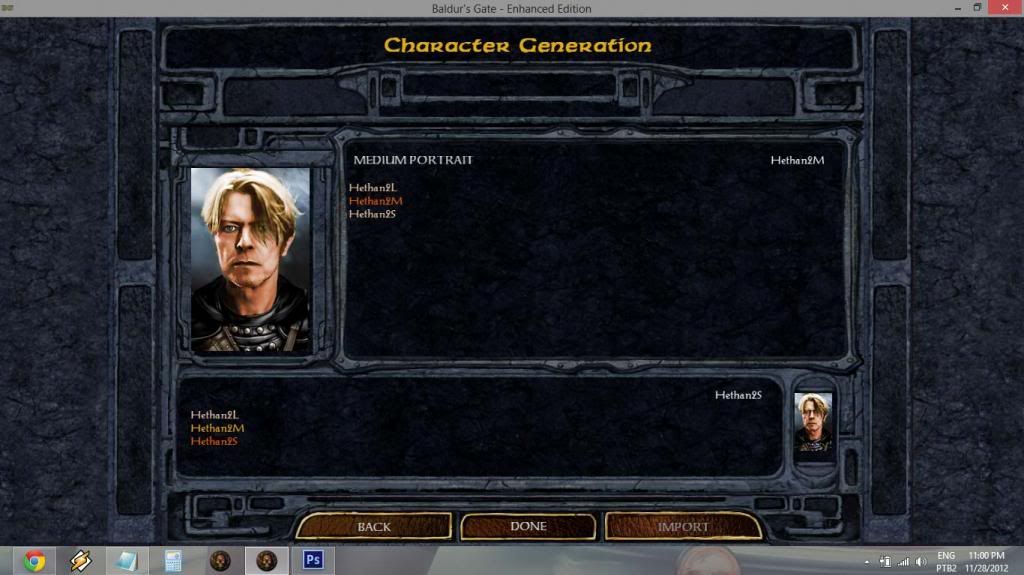 [/spoiler]
The Large portrait will be selected automatically according to the Medium one, or ignored (if there is no L version).
3.2 On a previously created character
If you're already playing a character and want to change it's portrait, go to his/her Record screen and hit the button labeled "CUSTOMIZE", then "APPEARANCE".
Once you're prompted to select his or her portrait, you will notice a button labeled "CUSTOM" now shows up on the screen.
This button will take you to the screen shown below, where you'll be able to select the Medium and Small portraits. They're not required to match - you can use different M and S portraits for one character if you so desire.
The Large portrait will be selected automatically according to the Medium one, or ignored (if there is no L version).
3.3 On an exported character
Changing the portrait of an exported character is just a little trickier. There are two ways you can do so:
3.3.1 Via importing/re-exporting
Import your character into a new game (or into a loaded multiplayer game), and then follow the steps on 3.2. After doing so, you can export it again so it'll remember your portrait selection.
3.3.2 Using a game editor
You can also use EEKeeper. Open your exported character using the program and click the "Change Portrait" button. You will notice your custom portraits are now listed along the others.
4. HOW TO CHANGE NPC PORTRAITS
As you probably already know, it's not possible to edit a NPC's portrait or soundset using the Customize menu under their record screen.
If you want to do it, however, you don't really need to use a game editor. There's a simple method that will not only apply to any game (new or previously saved), but it's easily reversible.
All you need is to have portraits that use certain specific file names which will be recognized by the game as the original portraits and be shown instead.
These files can be put on your Portraits folder. In fact, be careful not to use these names if you don't want to change a NPC's portrait. Though you will be able to select it for your character, the substitution will still occur.
To revert the process, simply rename or remove the files from your Portraits folder.
Hit the spoiler button to view the list of NPCs and their respective file names:
[spoiler]Ajantis - AJANTISL.bmp, AJANTISM.bmp, AJANTISS.bmp
Alora - ALORAL.bmp, ALORAM.bmp, ALORAS.bmp
Baeloth - BAELOTHL.bmp, BAELOTHM.bmp, BAELOTHS.bmp
Branwen - BRANWENL.bmp, BRANWENM.bmp, BRANWENS.bmp
Coran - CORANL.bmp, CORANM.bmp, CORANS.bmp
Dorn - DORNL.bmp, DORNM.bmp, DORNS.bmp
Dynaheir - DYNAHEIL.bmp, DYNAHEIM.bmp, DYNAHEIS.bmp
Edwin - EDWINL.bmp, EDWINM.bmp, EDWINS.bmp
Eldoth - ELDOTHL.bmp, ELDOTHM.bmp, ELDOTHS.bmp
Faldorn - FALDORNL.bmp, FALDORNM.bmp, FALDORNS.bmp
Garrick - GARRICKL.bmp, GARRICKM.bmp, GARRICKS.bmp
Imoen - IMOENL.bmp, IMOENM.bmp, IMOENS.bmp
Jaheira - JAHEIRAL.bmp, JAHEIRAM.bmp, JAHEIRAS.bmp
Kagain - KAGAINL.bmp, KAGAINM.bmp, KAGAINS.bmp
Khalid - KHALIDL.bmp, KHALIDM.bmp, KHALIDS.bmp
Kivan - KIVANL.bmp, KIVANM.bmp, KIVANS.bmp
Minsc - MINSCL.bmp, MINSCM.bmp, MINSCS.bmp
Montaron - MONTARL.bmp, MONTARM.bmp, MONTARS.bmp
Neera - NEERAL.bmp, NEERAM.bmp, NEERAS.bmp
Quayle - QUAYLEL.bmp, QUAYLEM.bmp, QUAYLES.bmp
Rasaad - RASAADL.bmp, RASAADM.bmp, RASAADS.bmp
Safana - SAFANAL.bmp, SAFANAM.bmp, SAFANAS.bmp
Shar-Teel - SHARTEL.bmp, SHARTEM.bmp, SHARTES.bmp
Skie - SKIEL.bmp, SKIEM.bmp, SKIES.bmp
Tiax - TIAXL.bmp, TIAXM.bmp, SKIES.bmp
Viconia - VICONIAL.bmp, VICONIAM.bmp, VICONIAS.bmp
[/spoiler]
Example: placing IMOENM.bmp and IMOENS.bmp on your portraits folder will make Imoen use these portraits instead of the original.
5. TROUBLESHOOTING
5.1 My custom portraits don't show up at all! (may or may not include: The "CUSTOM" button on the portrait selection isn't even there!)
Are they in the right folder? Double-check the path and if yes, make sure there aren't any typos on the folder name.
Was the game running before you put them there? If you change the contents of the Portraits folder while the game is running, you need to restart it in order for any changes or additions to be applied.
5.2 The file names show up but not the portraits - all I see is a blue silhouette with a question mark!
Make sure the files are 24-bit bitmaps.
If you are using MSPaint, the program will often save .bmp files as 32-bit, even if you specifically select the "24-bit bitmap" file format.
Simply changing the extension of .JPG images will not work. Open up the files in an image editor and save them as bitmaps.
If you're not sure on how to do that, read the next section.
6. A QUICK GUIDE ON EDITING AND SAVING IMAGES
If you're having problems saving or resizing your custom portraits, here are a few tips:
6.1 Resizing and proportions
To learn how to resize an image using MSPaint, check out this link (thanks to @SableRhapsody).
Now, most of the times the image you want to use as a portrait is not on the right proportions, and you most likely don't want it to be all streched or distorted when you save it. So how do we get around that?
You need to edit the image so it'll better "fit" inside the portrait dimensions. Using MSPaint to do that isn't the most practical way (you'll find out why soon enough), but if you really want to try, @Dee posted a quick guide right here.
Truth is, you are better off using a more sophisticated image editor. It doesn't take a graphic designer to do simple resizing and cropping - only patience and a few minutes to learn. I'll give you some tips on how to do it using free software - I figure if you are an Adobe Photoshop user, you don't need help with this.
6.1.1 Using Paint.net
(coming soon)
6.1.2 Using GIMP
[spoiler]GIMP is a free (and pretty powerful) image editor. In fact, it might be overkill for the task at hand (it's a 70MB download and it'll take around 150MB once installed), but it's a nice option if you also want to start fiddling around with other stuff (brightness, contrast, colors, etc). However, that's beyond the scope of this guide, at least for now.
To make a portrait using GIMP, follow these steps (hit the spoiler buttons to see the images):
1) Start by clicking File > New. This will open a "Create a New Image" window, where you'll set the file's width to 210 and the height to 330. Keep every other option as it is and hit OK. Now you have a window that looks like this:
[spoiler]
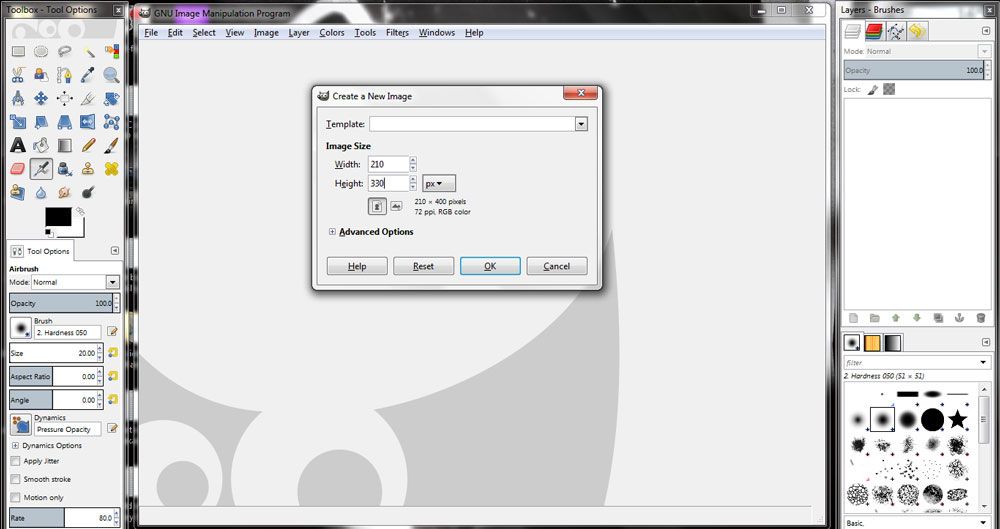 [/spoiler]
2) Go to the folder where the image you want to edit is. Click the file and drag it into the GIMP window, more specifically, into the image area (trust me, it'll work). Once you do that, you should see only part of the image inside the portrait dimensions. Don't worry, we're making progress.
[spoiler]
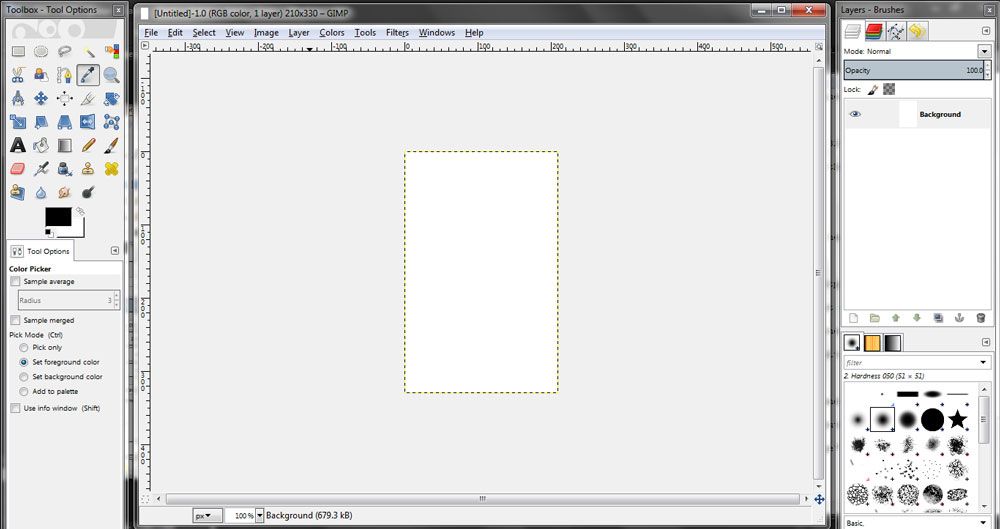 [/spoiler]
3) Now, take a look at the right part of the screen. There's a small window there named "Layers - Brushes", right? Notice that now that you've dragged your image into GIMP, there's a layer there named after your original image. In my case, here, it's "wizard". Make sure this layer is selected by clicking on it.
[spoiler]
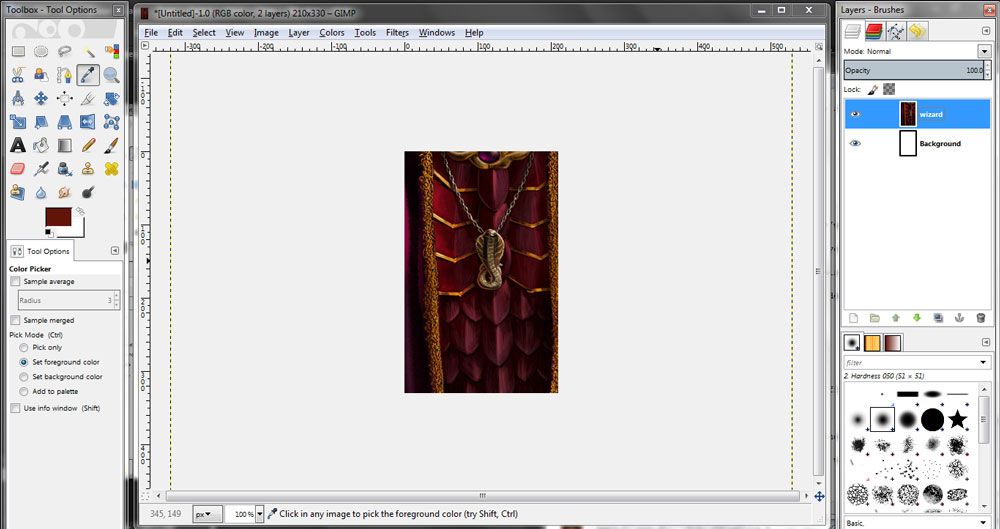 [/spoiler]
4) Now, take a look at the left part of the screen. There's a rather tall window there named "Toolbox - Tool Options". What we want to click there is the MOVE tool, which is highlighted on the next image. Click that icon.
[spoiler]
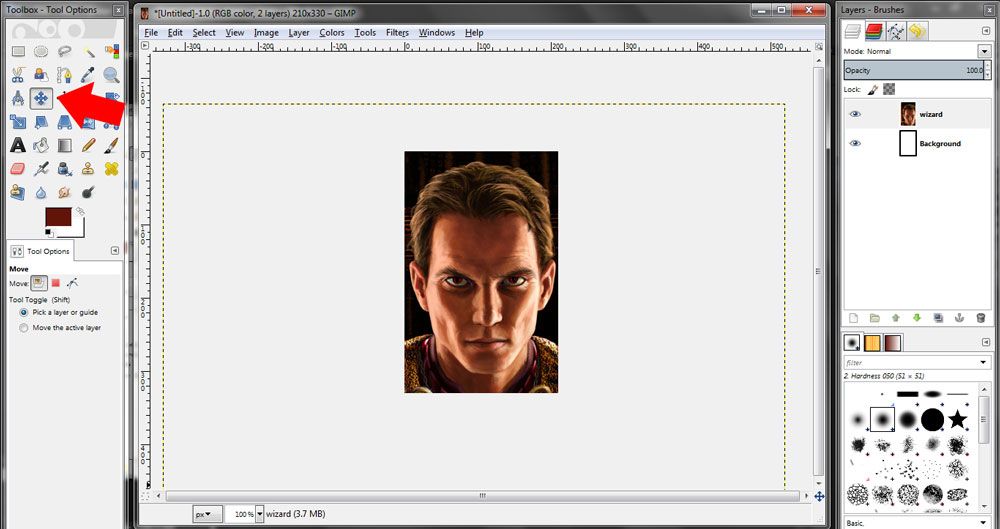 [/spoiler]
5) Now try clicking and dragging inside your new portrait area. You will notice this area is actually a canvas, or a bounding box. Although not completely visible, the entire image is still there. Move it around until it's "framed" exactly as you want. If you want to zoom out and show more of the image, follow the next step.
6) To resize your layer, select the SCALE tool (highlighted on the next image) by clicking on the icon and then click anywhere on the image. You will notice a small "Scale" window showed up, and the layer is fully visible, with a grid over it. Click on one of the layer's corners and drag it to resize it. If you hold CTRL, the aspect ratio will be kept, avoiding any distortions. Once it's done, you'll need to reposition your layer. Use the MOVE tool again as necessary.
[spoiler]
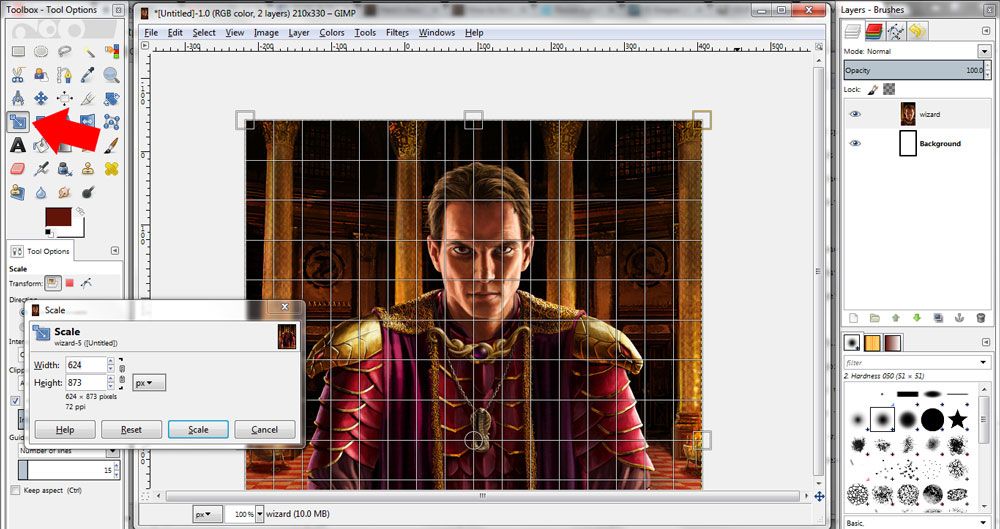 [/spoiler]
7) Once you're happy with how your portrait looks, it's time to save it. Hit File > Export, and on the Export Image window's lower right corner, hit the dropbox that says "All Export Images" and select "Windows BMP Image (*.bmp)". Select the folder where you want to save it, type in an appropriate name and hit Export.
[spoiler]
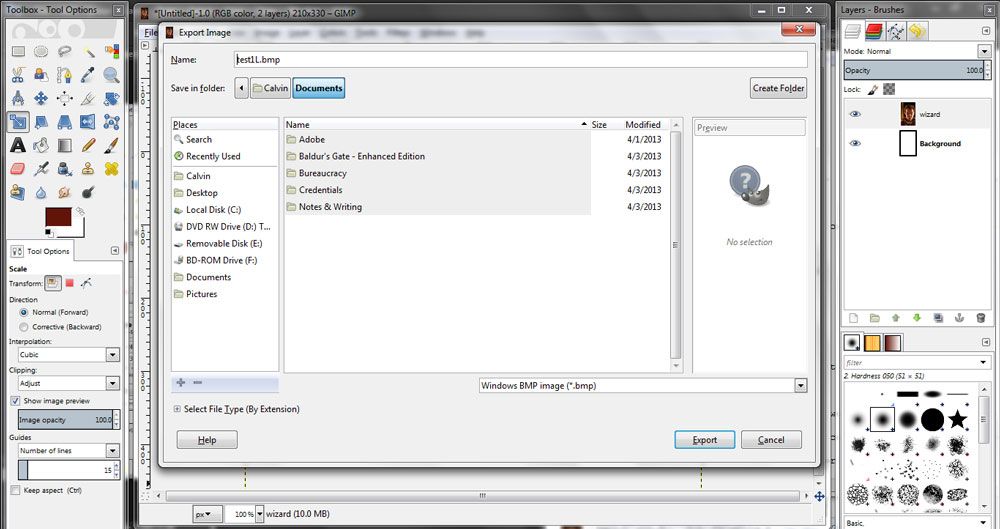 [/spoiler]
8) Now, before the image is saved, an "Export Image as BMP" window pops up. This is an important step - you need to expand the "Advanced Options" menu and select the "24 bits" option (R8 G8 B8). This will make sure the portrait works. Hit export and you're done...
[spoiler]
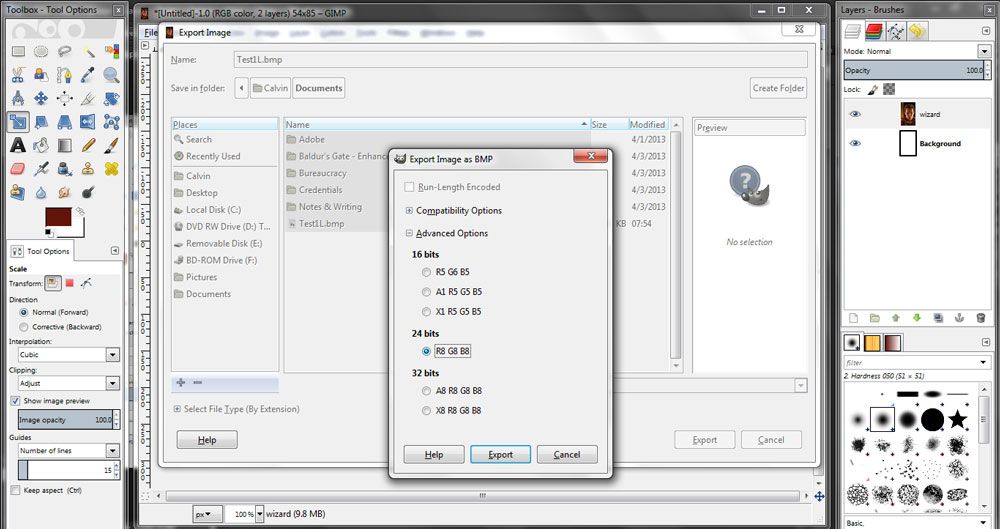 [/spoiler]
9) ...or almost. We still need the other sizes, right? To resize a whole image in GIMP, go to Image > Scale Image. On the "Scale Image" window, edit the width and height according to the M and S dimensions. Notice that unless you click the little "chain" button, the other axis will automatically adjust to keep the image proportional. Sometimes the measurements will be off by one or two pixels (the medium image will be 169x267, and the small 54x85, for example). This is okay.
10) Once you resized the image, follow step 7 to export it again to another BMP file.[/spoiler]
↧
Enhanced UI for Baldur's Gate II
Hi Guys, I love BG2EE UI style, but I think that many details and boundary element have not been treated with the necessary care by the devs, and then I started to work to try to improve them and then reach the definitive version of this!!!
As starting point I used the mod of @Pecca BG2EE Tweak:http://forum.baldursgate.com/discussion/31069/gui-mod-bg2-ee-gui-in-bg-ee/p1
Also I want to thank @Pecca even for the help and patience shown me!!
1: The various main title are too different from each other, and then I decided to unify and make it more homogeneous ...
![image]()
![image]()
![image]()
![image]()
As starting point I used the mod of @Pecca BG2EE Tweak:http://forum.baldursgate.com/discussion/31069/gui-mod-bg2-ee-gui-in-bg-ee/p1
Also I want to thank @Pecca even for the help and patience shown me!!
1: The various main title are too different from each other, and then I decided to unify and make it more homogeneous ...


↧
Which BG2EE mods for a first time modder?
Hey guys,
Long time BG2 fan here. I've played through the game countless times start to finish, but never with mods. I feel like I'm due for another run, and I've been eyeing the BG2 compatible list for some time now!
I'm really hoping to relive the story and memories of the original, but with new content to keep it fresh. I'm OK with any mod (NPCs, new kits, kit re-balancing, banter, tweaks, item packs, whatever) so long as it:
1) Blends smoothly into the vanilla content
2) Enhances the experience (or difficulty if in a "this is how it should be" way; SCS seems a good choice here)
3) Is balanced (exp, gold, and items!!). This last one is really important to me.
Any suggestions for entire mods (or specific components) is welcome and much appreciated!")
Long time BG2 fan here. I've played through the game countless times start to finish, but never with mods. I feel like I'm due for another run, and I've been eyeing the BG2 compatible list for some time now!
I'm really hoping to relive the story and memories of the original, but with new content to keep it fresh. I'm OK with any mod (NPCs, new kits, kit re-balancing, banter, tweaks, item packs, whatever) so long as it:
1) Blends smoothly into the vanilla content
2) Enhances the experience (or difficulty if in a "this is how it should be" way; SCS seems a good choice here)
3) Is balanced (exp, gold, and items!!). This last one is really important to me.
Any suggestions for entire mods (or specific components) is welcome and much appreciated!

↧


/english-betterindia/media/post_attachments/uploads/2023/03/farming-1679903068.jpg)


